


FREE DOWNLOAD: Business Analyst Documentation Toolkit
Get instant access to real-world BRD, FRD, and project story templates used by senior BAs.
Download Free Templates PDFIn modern software product development, JIRA and Confluence form the industry-standard tooling ecosystem for managing Agile backlogs and technical documentation.
For an Agile Business Analyst, configuring an efficient JIRA & Confluence setup is critical for bridging the gap between high-level business goals and technical execution. Mastering this suite ensures seamless requirements documentation in confluence and structured JIRA backlog management across Scrum and Kanban frameworks.
The Atlassian Ecosystem: JIRA vs. Confluence for BAs
While JIRA and Confluence are tightly integrated, an Agile Business Analyst uses them for distinct operational purposes:
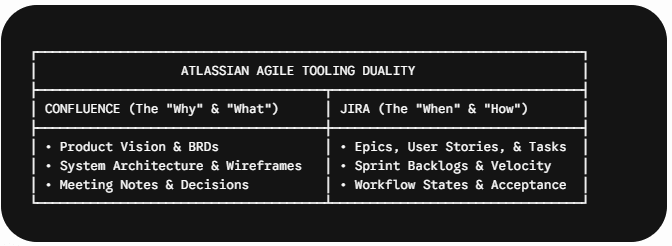
Confluence: Serves as the central repository for unstructured or living documentation (e.g., Product Specs, BRDs, Process Flow Diagrams, Data Dictionaries).
JIRA: Serves as the execution tracking engine for discrete, actionable work items (e.g., Backlog Items, Sprint Planning, Bug Tracking).
Step-by-Step JIRA & Confluence Setup Guide
Setting up an effective workspace for a new project or sprint requires configuring four core components:
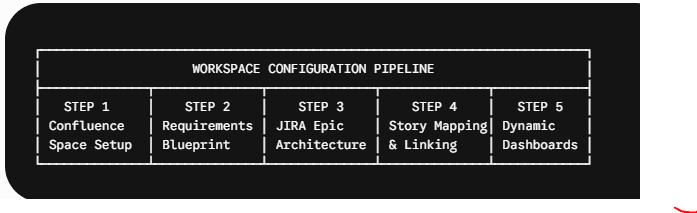
Step 1: Create the Confluence Project Space
Establish a dedicated Confluence Space linked directly to your JIRA Project key. Structure the left navigation tree using a standardized hierarchy:
01. Product Vision & Strategy
02. Requirements & BRDs
03. Process Models & Architecture
04. Sprint Release Notes
Step 2: Establish Requirements Documentation Templates
Utilize Confluence templates (such as the Product Requirements Blueprint) to maintain consistency across features. Key sections should include:
Context & Target Audience
Functional & Non-Functional Requirements
UI Mockups / Wireframes
API Specifications & Data Maps
Step 3: Configure the JIRA Issue Hierarchy
Set up the standard Atlassian issue hierarchy to maintain traceability:
Initiative: Multi-quarter business objectives.
Epic: Large capability requiring multiple sprints (e.g., Customer Onboarding Engine).
User Story / Task: Independent deliverable delivering business value.
Sub-Task: Individual technical tasks assigned to developers/designers.
Step 4: Link JIRA Requirements to Confluence Pages
Achieve 100% requirements traceability by embedding JIRA issues directly into Confluence pages using the /jira macro. This ensures that as developers update issue statuses in JIRA, the Confluence requirements spec automatically reflects real-time progress.
Step 5: Configure Agile Boards & Backlog Filters
Set up Scrum or Kanban boards with tailored swimlanes and custom workflow states:
Backlog $\rightarrow$ Refinement $\rightarrow$ Ready for Dev $\rightarrow$ In Progress $\rightarrow$ QA/Testing $\rightarrow$ Done.
Best Practices for JIRA Backlog Management
To keep team productivity high during sprint refinement, an Agile Business Analyst should enforce these backlog standards:
| Practice | Objective | BA Execution Rule |
| Definition of Ready (DoR) | Pre-requisite for sprint planning | Story must have INVEST attributes, acceptance criteria, and linked Confluence specs. |
| Definition of Done (DoD) | Pre-requisite for closing an issue | Code reviewed, automated tests passed, and Confluence docs updated. |
| Jira Smart Commits | Technical traceability | Developers link commits to JIRA keys (e.g., git commit -m "PROJ-123 add API route"). |
Real-World BA Scenario: Linking Confluence Specs to JIRA Epics
Context: An Agile Business Analyst is managing a payment gateway integration project across two cross-functional teams.
Workflow Execution:
The BA drafts the full payload specification on a Confluence page titled “Payment Gateway Integration Requirements”.
Using the JIRA Integration Feature, the BA creates Epics and User Stories directly from the text within Confluence.
During JIRA backlog management, the team views the embedded Confluence link directly within the JIRA sidebar, giving developers single-click access to full design mockups and API contracts.
Frequently Asked Questions (FAQs)
An Agile Business Analyst structures Confluence documentation spaces, creates JIRA issue templates, facilitates backlog refinement using JIRA boards, and establishes traceability links between business requirements and execution tickets.
Setting up an integrated JIRA & Confluence setup is an essential skill for any Agile Business Analyst operating in modern software engineering environments.
By connecting requirements documentation in Confluence directly to user stories and backlogs in JIRA, BAs can streamline JIRA backlog management, enforce the Definition of Ready (DoR), and maintain end-to-end traceability across sprint lifecycles.
📄 Business Analysis Documentation Hub
Explore where Agile tooling fits into requirement management, diagramming, and software lifecycles:
| Knowledge Area | Deep-Dive Article | Why It Matters for a Business Analyst |
|---|---|---|
| BA Tools & Automation | JIRA & Confluence Setup Guide | Master Agile tooling configuration, user story mapping, backlog management, and requirements linking. |
| Requirements Engineering | What is a Functional Requirement? | Learn how to break down high-level functional requirements into actionable JIRA user stories. |
| Documentation & Artifacts | Business Analysis Templates & Examples | Access standardized Confluence blueprint templates for BRDs, FRDs, and user stories. |
| Diagramming & Modeling | Process Flow Diagram & BPMN 2.0 Guide | Discover how to embed interactive BPMN 2.0 diagrams into Confluence feature specification pages. |
| Visual Modeling & Diagrams | 5 Steps to Creating an Effective Use Case Diagram | Attach Use Case models to JIRA Epics to give development teams visual context during sprint planning. |
| Software Lifecycles | Understanding the Spiral Life Cycle Model | Explore how Agile backlogs and iterative JIRA boards map onto risk-driven development lifecycles. |
🎁 Become a Better Business Analyst
Join 1,200+ Business Analysts learning every week.
Get instant access to:
📘 FREE Business Analyst Templates
🎯 Interview Preparation Guides
🚀 Agile & Scrum Tutorials
🤖 AI for Business Analysts
📈 Career Growth Tips
100% Free • No Spam • Unsubscribe Anytime
