

FREE DOWNLOAD: Business Analyst Documentation Toolkit
Get instant access to real-world BRD, FRD, and project story templates used by senior BAs.
Download Free Templates PDFUAT (User Acceptance Testing) is the final phase of the software testing process where end users or business stakeholders test the software to verify that it meets real-world business requirements.
For a Business Analyst, leading an effective UAT process bridges the gap between software developers and business operations. It ensures that the application is not just bug-free, but completely ready for production deployment.

What Is UAT (User Acceptance Testing)?
User Acceptance Testing (UAT) validates whether a completed software solution satisfies defined business needs and operational workflows.
While QA (Quality Assurance) testing focuses on finding technical bugs, broken code, and boundary errors, UAT testing focuses on business usability, user satisfaction, and end-to-end operational execution.
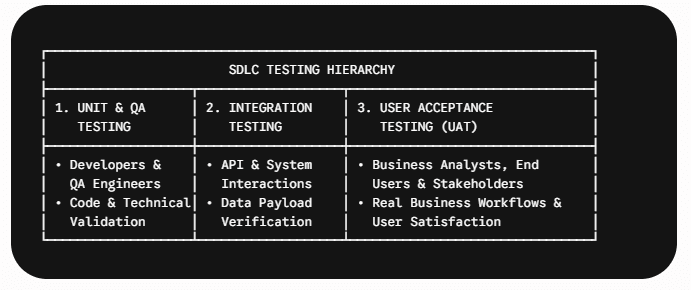
The 5-Step UAT Execution Process for Business Analysts
A successful UAT testing process requires systematic planning and execution by the Business Analyst:
1. Requirements & Entry Criteria Review
Ensure the software build has passed internal QA testing and meets the Definition of Done (DoD) before initiating UAT.
2. Drafting UAT Test Cases & Scenarios
Translate functional requirements and user stories into business-focused UAT test cases using real-world operational scenarios rather than technical steps.
3. Setting Up the UAT Test Environment & Data
Prepare a dedicated UAT environment populated with realistic, sanitized business test data (e.g., sample customer accounts, mock transactions).
4. Training Business Testers & Executing Tests
Guide non-technical stakeholders through UAT execution, assisting them as they navigate scenarios and log feedback.
5. Defect Triage & Business Sign-Off
Classify defects (Critical vs. Cosmetic), coordinate with dev teams for fixes, and obtain formal UAT sign-off from executive sponsors.
QA Testing vs. UAT Testing: Key Differences
| Feature | Quality Assurance (QA) Testing | User Acceptance Testing (UAT) |
| Primary Goal | Find technical defects and code errors. | Verify software fulfills business requirements. |
| Primary Testers | QA Software Testers & Automation Engineers. | Business Analysts, Key Stakeholders, End Users. |
| Focus Area | Unit logic, API integration, performance, edge cases. | Business process flow, UI usability, business rules. |
| Test Environment | QA Staging / Dev Test Environments. | Dedicated UAT Environment with real business data. |
Real-World BA Scenario: Conducting UAT for Core Banking Onboarding
Context: A Senior BA is facilitating UAT for a newly automated digital account creation module.
Execution:
Scenario: A branch officer attempts to open a savings account for a non-resident client.
UAT Test Case: Verify that the system enforces mandatory passport upload requirements before generating a CIF number.
Triage: The tester notices the system generates the account, but fails to trigger the automated welcome email. The BA logs a Priority-2 issue in JIRA, coordinates a patch deployment to the UAT server, retests with the business officer, and secures final operational sign-off.
The importance of UAT in software development
As mentioned earlier, User Acceptance Testing is a crucial step in the software development lifecycle. It ensures the final product meets the customer’s requirements, and it is essential for the following reasons:
### 1. Ensures customer satisfaction
The primary goal of User Acceptance Testing is to ensure customer satisfaction. It helps to identify any defects or issues that may affect the usability, functionality, or performance of the application. By involving the customer in the User Acceptance Testing process, you can ensure that the product meets their needs and expectations.
### 2. Reduces the risk of defects
User Acceptance Testing helps to identify any defects or issues before the application goes live. Identifying and fixing defects early in the development process can save time and money in the long run. User Acceptance Testing helps to reduce the risk of defects in the final product.
### 3. Improves the quality of the product
User Acceptance Testing helps to improve the quality of the product by identifying any issues or defects that may affect the usability, functionality, or performance of the application. By fixing these issues, you can improve the overall quality of the product.
### 4. Increases customer confidence
By involving the customer in the User Acceptance Testing process, you can increase their confidence in the product. It shows that you value their input and are committed to delivering a product that meets their needs and expectations.
UAT process and steps
The User Acceptance Testing process can vary depending on the organization and the project’s scope. However, the following are the general steps involved in the UAT process:
### 1. Define the scope of UAT
The first step in the User Acceptance Testing process is to define the scope of User Acceptance Testing. It’s essential to identify which features of the application will be tested, what the acceptance criteria are, and who will be involved in the testing. Clearly defining the scope of User Acceptance Testing will ensure that everyone involved in the process understands what to expect.
### 2. Prepare for UAT
Preparing for User Acceptance Testing involves setting up the testing environment, identifying the testing tools required, and preparing the test cases. It’s essential to ensure that the testing environment is similar to the production environment to get accurate results.
### 3. Create UAT test cases
Creating effective User Acceptance Testing test cases is essential for the success of User Acceptance Testing. The test cases should be based on the acceptance criteria and cover all the features of the application. It’s important to involve the customer in creating the test cases to ensure that they reflect their needs and expectations.
### 4. UAT execution and tracking
During the User Acceptance Testing execution phase, the testers will run the test cases and identify any defects or issues. It’s essential to track the defects and issues and prioritize them based on their severity. The development team should fix the defects, and the testers should retest the application to ensure that the issues have been resolved.
### 5. UAT sign-off
The UAT sign-off phase involves the customer signing off on the product’s final version. It’s essential to ensure that the customer is satisfied with the product before signing off on it. Once the sign-off is obtained, the application is ready to go live.
How to prepare for UAT
Preparing for UAT is a crucial step in ensuring the success of User Acceptance Testing. The following are some tips on how to prepare for User Acceptance Testing:
### 1. Set up the testing environment
It’s essential to set up the testing environment to ensure that it’s similar to the production environment. This will ensure that the testing results are accurate and reliable.
### 2. Identify the testing tools required
Identifying the testing tools required is essential for the success of User Acceptance Testing. There are many testing tools available in the market, and it’s essential to choose the right tools based on the project’s requirements.
### 3. Prepare the test data
Preparing the test data is essential for the success of User Acceptance Testing. The test data should be based on the acceptance criteria and reflect the customer’s needs and expectations.
Creating effective UAT test cases
Creating effective UAT test cases is essential for the success of User Acceptance Testing. The following are some tips on how to create effective UAT test cases:
### 1. Involve the customer
It’s essential to involve the customer in creating the test cases to ensure that they reflect their needs and expectations.
### 2. Base the test cases on acceptance criteria
The test cases should be based on the acceptance criteria and cover all the features of the application.
### 3. Ensure test cases are clear and concise
The test cases should be clear and concise to ensure that the testers understand what to test and how to test it.
UAT execution and tracking
User Acceptance Testing execution and tracking are crucial for the success of UAT. The following are some tips on how to execute UAT and track the results:
### 1. Identify defects and issues
During the User Acceptance Testing execution phase, the testers should identify any defects or issues. It’s essential to prioritize the defects based on their severity.
### 2. Fix defects
The development team should fix the defects identified during the UAT execution phase.
### 3. Retest the application
The testers should retest the application after the defects have been fixed to ensure that the issues have been resolved.
UAT best practices
The following are some User Acceptance Testing best practices that can help ensure the success of UAT:
### 1. Involve the customer in the UAT process
Involving the customer in the User Acceptance Testing process is essential for ensuring customer satisfaction.
### 2. Define the scope of UAT
Defining the scope of User Acceptance Testing is essential for ensuring that everyone involved in the process understands what to expect.
### 3. Prepare for UAT
Preparing for User Acceptance Testing involves setting up the testing environment, identifying the testing tools required, and preparing the test cases.
### 4. Create effective UAT test cases
Creating effective UAT test cases is essential for the success of UAT.
### 5. Execute UAT and track the results
Executing User Acceptance Testing and tracking the results are crucial for the success of User Acceptance Testing.
Common User Acceptance Testing challenges and how to overcome them
The following are some common UAT challenges and how to overcome them:
### 1. Lack of customer involvement
Lack of customer involvement can lead to a product that does not meet the customer’s needs and expectations. It’s essential to involve the customer in the User Acceptance Testing process to ensure customer satisfaction.
### 2. Poorly defined scope
Poorly defined scope can lead to confusion and misunderstandings. It’s essential to define the scope of UAT to ensure that everyone involved in the process understands what to expect.
### 3. Limited testing time
Limited testing time can lead to incomplete testing and missed defects. It’s essential to allocate enough time for User Acceptance Testing to ensure that all the features of the application are tested thoroughly.
Tools for UAT
There are many UAT tools available in the market. The following are some of the popular UAT tools:
### 1. Selenium
Selenium is an open-source UAT tool that automates web browsers.
### 2. TestRail
TestRail is a web-based UAT management tool that helps manage test cases, track results, and generate reports.
### 3. JIRA
JIRA is a project management tool that includes UAT management capabilities.
Conclusion
In conclusion, UAT is a critical step in the software development lifecycle that ensures the final product meets the customer’s requirements. By following the tips outlined in this article, you can conduct effective User Acceptance Testing that ensures customer satisfaction. From defining the scope of User Acceptance Testing to involving the right stakeholders, preparing for User Acceptance Testing, creating effective User Acceptance Testing test cases, executing User Acceptance Testing and tracking the results, and overcoming common User Acceptance Testing challenges, these best practices will ensure the success of User Acceptance Testing. Remember to involve the customer in the User Acceptance Testing process, and use the right tools to get the best results.
Related Articles
- What is uat environment in software development?
- What is uat testing in software development?
- What is UAT (User Acceptance Test)?
Frequently Asked Questions (FAQs)
The BA acts as the primary UAT coordinator. Responsibilities include writing UAT test plans, preparing business test data, training end-user testers, managing defect triage sessions with developers, and securing official business sign-off.
Entry Criteria: QA testing sign-off, zero open critical defects, UAT environment deployment, and approved UAT test cases.
Exit Criteria: All high-priority UAT test cases passed, business defects resolved, and formal sign-off from project sponsors.
Conducting effective UAT (User Acceptance Testing) is critical for ensuring that software releases meet business expectations and deliver user satisfaction.
For a Business Analyst, managing the UAT testing process—from writing business-centric UAT test cases to facilitating stakeholder sign-off—bridges requirements engineering with production deployment.
📄 Business Analysis & Quality Assurance Hub
Explore how UAT connects with QA testing, Agile user stories, and requirements documentation:
| Knowledge Area | Deep-Dive Guide | Why It Matters for a Business Analyst |
|---|---|---|
| UAT Execution | Effective UAT Execution Guide | Master UAT planning, test case drafting, defect triage, and business sign-off workflows. |
| QA & Testing Tools | Quality Assurance & QA Role Guide | Learn how QA testing sets entry criteria for UAT and how to leverage testing software. |
| Agile Requirements | Agile User Stories Comprehensive Guide | Derive end-to-end UAT test scenarios directly from user story acceptance criteria. |
| Agile Tooling | JIRA & Confluence Setup Guide | Track UAT defect tickets and test execution results directly within JIRA boards. |
| Requirements Engineering | What is a Functional Requirement? | Ensure business rules in functional requirements are fully verifiable during UAT. |
🎁 Become a Better Business Analyst
Join 1,200+ Business Analysts learning every week.
Get instant access to:
📘 FREE Business Analyst Templates
🎯 Interview Preparation Guides
🚀 Agile & Scrum Tutorials
🤖 AI for Business Analysts
📈 Career Growth Tips
100% Free • No Spam • Unsubscribe Anytime

3 thoughts on “How to Conduct Effective UAT (User Acceptance Testing) to Ensure Customer Satisfaction”