
Digital marketing is no longer just about creative campaigns and social media presence—it is a data-driven, technology-dependent ecosystem. Business Analysis in Digital Marketing bridges the gap between marketing strategies and technical execution. By applying Business Analysis (BA) principles, organizations can
Tag: user acceptance testing
User Acceptance Testing (UAT) is a critical phase in the software development lifecycle where the intended software users test the application to make sure it can handle required tasks in real-world scenarios, as specified. It’s the final testing performed before releasing the application for production.
Here’s a more detailed look at UAT:
- Purpose:
- To validate that the developed solution aligns with business needs and user requirements.
- To ensure that the software behaves as expected in real-world scenarios.
- To identify any issues from a user’s perspective before the software goes live.
- Who Performs UAT?:
- Typically, actual users of the software, business stakeholders, or a dedicated UAT team. These are not the software developers or the QA (Quality Assurance) testers but rather those who will be using the software once it’s released.
- UAT Environment:
- The UAT environment should closely mirror the production environment to ensure realistic testing. This includes similar hardware, data configurations, and other system components.
- UAT Process:
- Planning: Define UAT objectives, select user testers, and create a UAT plan.
- Designing test cases: UAT test cases are designed based on real-world scenarios that the software will encounter. These test cases are then reviewed and approved.
- Setting up the environment: Ensure that the UAT environment is ready and populated with appropriate data.
- Executing test cases: Users execute the defined test cases, and possibly some exploratory testing.
- Documenting: Any issues, discrepancies, or bugs encountered during testing are documented.
- Resolving issues: Development teams address any issues raised, after which UAT may be re-conducted to ensure problems are resolved.
- Sign-off: Once all tests are successful and any discovered issues have been addressed, stakeholders or user representatives provide a formal “UAT Sign-off.” This indicates that they are satisfied with the system and it’s ready for production.
- Challenges in UAT:
- Ensuring that users are available and committed to testing.
- Handling discrepancies between expected and actual outcomes.
- Managing changes to requirements or scope.
- Dealing with the discovery of significant issues so close to the intended release date.
- Importance of UAT:
- It ensures that the software is fit for purpose.
- It reduces the risk of post-release defects that can be costly and damaging to an organization’s reputation.
- It ensures that user needs, business processes, and workflow integrations are effectively met.
In essence, UAT is about making sure that end-users and stakeholders are satisfied with the software solution and are confident in its ability to meet business needs in the real world.
What is a Requirement Traceability Matrix (RTM) in Software Testing?
Introduction
As software testers, a common dilemma is the everlasting question, “How do we know that we have tested everything?”. Without correlating our test cases to the requirements, our QA teams are basically flying blind. And that is exactly where
The Synergy of Automation and Testing
In today’s fast-paced digital landscape, where software development cycles are becoming increasingly rapid and complex, the importance of effective testing methodologies cannot be overstated. Software testing plays a pivotal role in ensuring that applications meet quality standards, perform reliably, and
Demystifying Stress Testing in Software Testing
In the realm of software development, ensuring the reliability and robustness of applications is paramount. One crucial aspect of this assurance is stress testing. Stress testing is a method used to evaluate how a system behaves under intense conditions and
Crafting an Effective Test Plan in Software Testing
Crafting an Effective Test Plan in Software Testing.
In the realm of software development, ensuring that a product functions as intended is paramount. Amidst the intricate web of coding and design, lies a crucial document that serves as the guiding
Role of a QA Software Tester: The Guardian of Digital Excellence
Quality Assurance: The Role of Software Tester Software
The Role of Software Tester Software
The Role of Software Tester Software : In the rapidly evolving landscape of software development, ensuring the quality of applications is paramount. This responsibility falls largely on the shoulders of software testers who meticulously
Unveiling the Role of a Functional Software Tester
Introduction: In the realm of software development, quality assurance stands as a cornerstone for ensuring the success of any digital product. Among the various roles within QA, the functional software tester holds a vital position. Tasked with scrutinizing the software
Unveiling the Role of a Software Automation Tester: Driving Efficiency in Modern Development
In the ever-evolving landscape of software development, efficiency, reliability, and speed are paramount. In this digital era where software solutions power virtually every aspect of our lives, the role of a Software Automation Tester emerges as a crucial linchpin in
What is a Bug in Testing
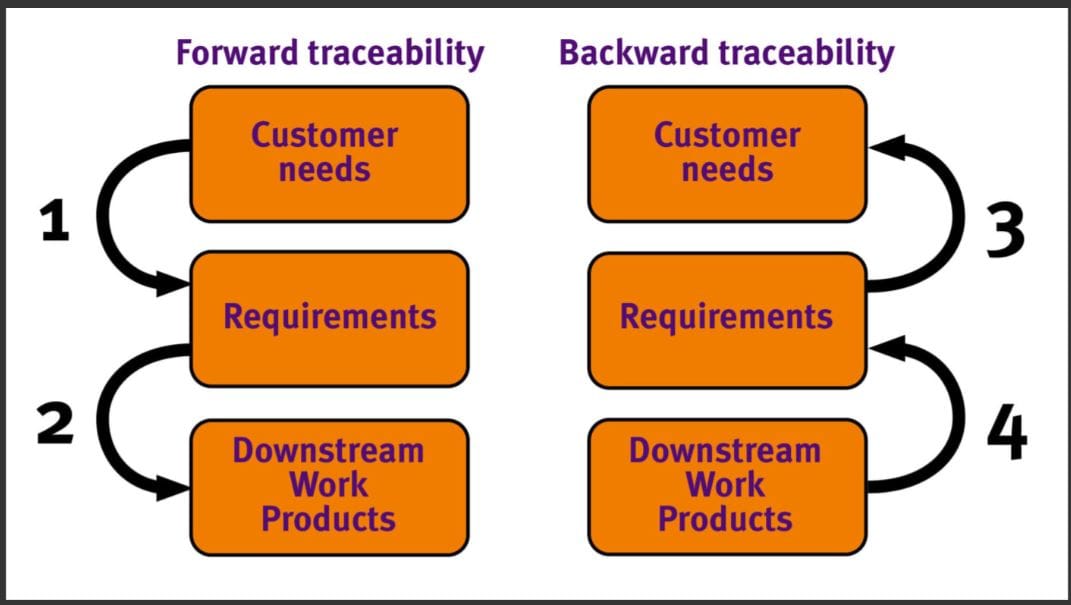
Traceability Matrix in Software Testing with examples
A Traceability Matrix is a tool used in software testing to ensure that all requirements have been addressed and tested. It establishes a relationship between various stages of software development and testing,
What is Requirement Traceability Matrix and How to use it
A Requirement Traceability Matrix (RTM) is a tool used in project management and software development to ensure that all requirements are identified, documented, and fulfilled throughout the project lifecycle. The primary purpose of an RTM is to establish a link
Differences between Manual Testing and Automation Testing
What are the differences between Manual Testing and Automation Testing
Manual testing and automation testing are two approaches used in software testing, each with its own advantages and limitations. Here are the key differences between manual testing and AutomationTesting:
What is System Testing in Software Testing
What is Smoke Testing in Software Testing
Smoke testing, also known as build verification testing or sanity testing, is a preliminary testing process used to determine whether the software build is stable enough for more in-depth testing. The primary goal
What is Alpha Testing and Beta Testing
Alpha testing and beta testing are two stages in the software testing process, each serving a distinct purpose in the development life cycle.
What is Integration Testing in Software Engineering
What are the types of Testing in Software Engineering
What are the types of testing in Software Engineering
Software testing is a crucial part of the software development process, and there are several types of testing used to ensure the quality and reliability of software. Here are some of
What is Unit Testing in Software Engineering
Unit Testing in Software Engineering : Unit testing is a software testing technique that focuses on evaluating individual units or components of a software application in isolation. In software engineering, a “unit” typically
What is Regression Testing in Software Testing
Regression testing is a type of software testing that aims to verify that recent changes or new code in a software application have not adversely affected the existing functionality. It ensures that the