

FREE DOWNLOAD: Business Analyst Documentation Toolkit
Get instant access to real-world BRD, FRD, and project story templates used by senior BAs.
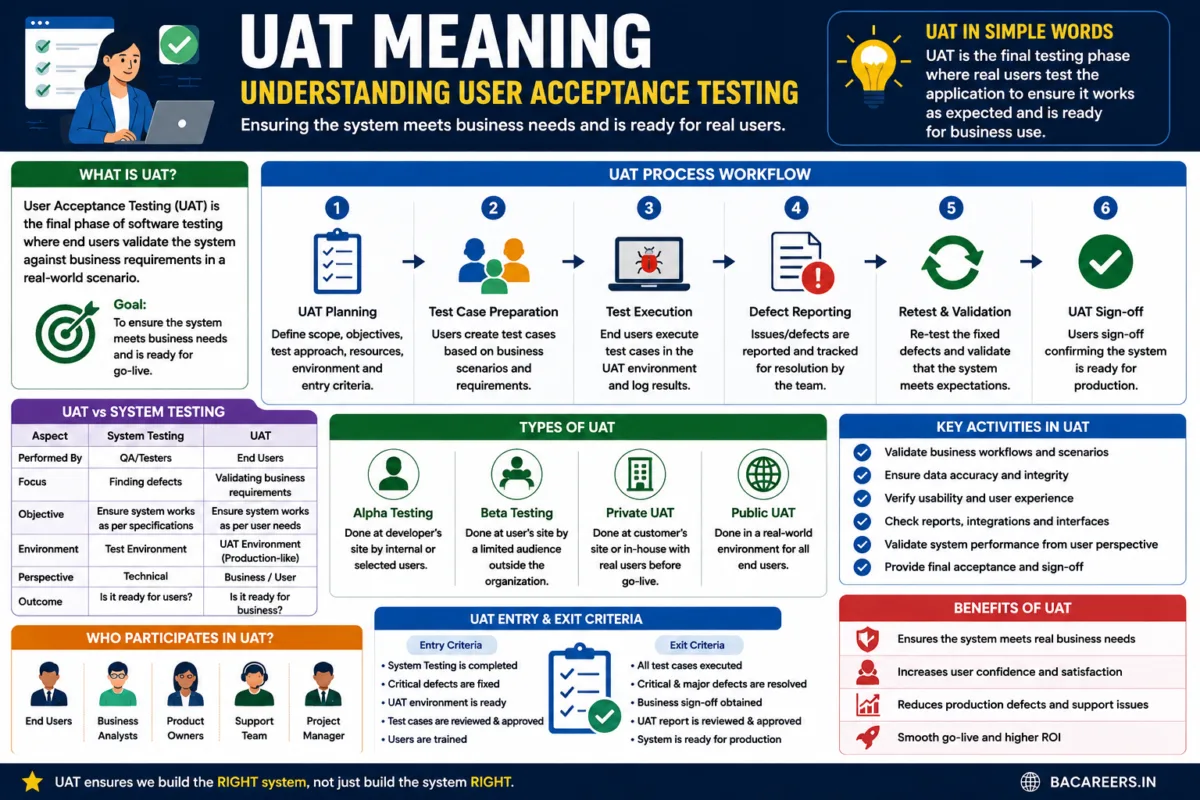
Download Free Templates PDFUAT, which stands for User Acceptance Testing, is the final phase of the software testing process where real end users, business stakeholders, or clients test the application in a production-like environment to verify whether the software meets agreed business requirements before deployment.
What is UAT (User Acceptance Testing)?
UAT serves as a vital checkpoint in software engineering and business analysis to move from the purely technical space to the actual working world of the business. Where development & QA tests to see if it’s built the right way per design specifications, UAT answers the much simpler “is this the right tool for the business job and will it actually work for the user?” With this process occurring near the end of SDLC cycles and within each sprint for Agile projects, if successful it requires formal business signoff to ready itself for production use.
Key Takeaway: The purpose of the last level of QA testing (UAT) is to determine if software is good enough for operational use, not just if it is constructed the right way for the purpose for which it was planned in the code spec.
Comparison: System Testing vs. UAT
Understanding the distinction between internal QA testing and business acceptance testing is essential for project governance:
| Comparison Metric | System Testing (QA) | User Acceptance Testing (UAT) |
| Primary Goal | Verify technical functionality, code quality, and system integration | Validate business workflows, user usability, and real-world scenarios |
| Who Conducts It? | Internal Quality Assurance (QA) Engineers | Business Users, Subject Matter Experts (SMEs), End Clients |
| Test Environment | Staging / QA Test Environment | UAT Environment (pre-production mirror with realistic data) |
| Test Scenarios | Functional test scripts, edge cases, regression paths | End-to-end business process scenarios and user journeys |
| Success Focus | Is the code bug-free and compliant with specifications? | Is the software fit for business purpose and operational use? |
Key Phases of the UAT Execution Process
The UAT execution is broken into the following five process stages:
* UAT Planning & Strategy
Define acceptance criteria, identify business user testers, and set up a pre-production UAT test environment.
* Design UAT Test Scenarios
The Business Analyst (BA) converts Business Requirements Documents (BRD) and User Stories into real-world business test cases.
* Execute UAT Scenarios
Business users execute end-to-end workflows, log defects, and provide usability feedback.
* Defect Triage & Resolution
BAs and Project Managers evaluate reported defects, categorize them (Critical, Major, Minor), and coordinate fix releases with development.
* Business Sign-Off & Go-Live Approval
Business sponsors review final test execution results and issue formal sign-off for production deployment.
Real-World Example: UAT Test Scenario for an HR Portal
Below is a practical scenario demonstrating how a UAT test script is structured:
Test Scenario: UAT-HR-003 — Employee Leave Request Approval
Business Objective: Validate that an employee can submit a paid leave request and their direct manager receives a notification to approve or reject it.
Pre-conditions: Employee has available leave balance $> 0$; Manager profile is correctly linked.
UAT Steps:
Log into the HR portal as an Employee.
Navigate to Time Off $\rightarrow$ Apply Leave.
Select dates (e.g., Oct 10 to Oct 12) and submit the request.
Log out and log in as the Reporting Manager.
Check notification inbox, open pending request, and click Approve.
Expected Result:
Employee receives an instant email confirmation.
Employee’s leave balance automatically updates ($-3\text{ days}$).
HR dashboard reflects updated team availability calendar.
Pass / Fail Status: $\text{PASS}$ / $\text{FAIL}$
Role of the Business Analyst (BA) in UAT
As stated above, UAT is one of the most critical points of engagement in which a Business Analyst plays a key role as the bridge between two distinct and necessary groups. The Business Analyst translates the complex developer inquiries into business speak for the business testers, and translates the business language spoken by these business testers into techie lingo they will understand for development team inquiries.
In addition the BA will also do the following during the UAT cycle:
* Writing UAT Test Scenarios. The Business Analyst designs and organizes BAs will plan out and write all individual user tests based on functional requirement documentation and the user stories submitted by the BA/ Product team.
* Help facilitate test runs. Even though most UAT tests will be written as scripts that walk the business users through each system operation, Business Analysts should have the knowledge and ability to assist those business testers with navigation into and out of these unfamiliar systems as well as a general overview of what is expected out of this testing.
* Facilitate defect verification. If a test does not pass the business user should report the issue back into to a project tracker, and the BA should help determine if it is a defect or a change request to something else.
Frequently Asked Questions (FAQ)
What does UAT stand for in business analysis?
UAT stand for User Acceptance Testing. This is a common and final form of testing carried out prior to commercial or production go-live or release.
What are the main types of UAT?
There are several types of User Acceptance Testing in particular the main ones being Alpha Testing,Beta Testing, Operational Acceptance Testing (OAT), and Contractual/Regulatory User Acceptance Tests.
Who gives final signoff for UAT?
Typically Final UAT Testing occurs when either The Business or The Executive Sponsorship provide sign off after all issues encountered have been resolved and successfully retested.
UAT process and steps
The User Acceptance Testing (UAT) process typically follows a series of steps to ensure thorough testing and validation of the software. These steps include:
- **Planning**: In this initial phase, the objectives and scope of the UAT are defined. Test scenarios and criteria are established, and roles and responsibilities are assigned to the stakeholders involved.
- **Preparation**: During this phase, test cases are created based on the defined test scenarios and criteria. Test data is prepared, and the test environment is set up to mimic the real-world conditions in which the software will be used.
- **Execution**: The actual testing takes place in this phase. End-users perform the predefined test cases and provide feedback on the software’s usability, functionality, and overall user experience. Any issues or bugs discovered are documented and reported.
- **Issue resolution**: Once issues are identified, they are logged, prioritized, and assigned to the appropriate team members for resolution. The software is then retested to ensure that the issues have been successfully addressed.
- **Sign-off**: In the final phase, stakeholders review the test results and determine whether the software meets the defined acceptance criteria. If the software meets the required standards, it is approved for release to end-users. If not, further iterations of testing and issue resolution may be required.
Best practices for conducting UAT
To ensure the success of User Acceptance Testing (UAT), it is essential to follow some best practices. Here are a few tips to conduct UAT effectively:
- **Early involvement of end-users**: Engage end-users from the early stages of development to gather their requirements and expectations. Their involvement throughout the UAT process will ensure that the software meets their needs and preferences.
- **Clear acceptance criteria**: Define clear acceptance criteria, test scenarios, and test cases to ensure that the software is thoroughly tested. These criteria should be aligned with the project objectives and user requirements.
- **Realistic test environment**: Create a test environment that closely resembles the real-world conditions in which the software will be used. This will help identify any issues or bugs that may arise in the actual usage scenario.
- **Effective communication**: Maintain open lines of communication between the development team, project managers, and end-users throughout the UAT process. Regular meetings, progress updates, and feedback sessions are essential for ensuring a smooth testing process.
- **Comprehensive documentation**: Document all test cases, issues, and resolutions to maintain a record of the testing process. This documentation will be useful for reference in future projects and can help identify patterns and improve the overall testing process.
By following these best practices, UAT can be conducted more efficiently and effectively, resulting in higher-quality software that meets user expectations.
Common challenges in UAT and how to overcome them
User Acceptance Testing (UAT) can present several challenges that need to be addressed for a successful testing process. Some common challenges include:
- **Limited user availability**: End-users may have limited availability to participate in UAT due to their other responsibilities. To overcome this challenge, project managers should plan UAT activities well in advance and ensure that end-users are aware of their roles and responsibilities.
- **Lack of clear acceptance criteria**: Without clear acceptance criteria, it can be challenging to determine whether the software meets the defined standards. To overcome this challenge, stakeholders should collaborate to establish clear acceptance criteria and ensure that they are communicated to all parties involved.
- **Incomplete or inaccurate test data**: Test data plays a crucial role in UAT, and incomplete or inaccurate test data can lead to unreliable results. To address this challenge, project managers should work closely with end-users to gather relevant and realistic test data that reflects the actual usage scenarios.
- **Resistance to change**: End-users may resist changes introduced during UAT, especially if they have become accustomed to the existing system. To overcome this challenge, effective communication and change management strategies should be employed to ensure that end-users understand the benefits of the new software and are willing to embrace the changes.
- **Lack of collaboration**: UAT requires close collaboration between the development team, project managers, and end-users. Lack of collaboration can hinder the testing process and result in incomplete or inadequate testing. To overcome this challenge, regular communication and feedback sessions should be conducted to foster collaboration and address any issues or concerns.
By proactively addressing these challenges, UAT can be conducted more smoothly, resulting in improved software quality and user satisfaction.
Tools and technologies for effective UAT
Several tools and technologies can enhance the effectiveness of User Acceptance Testing (UAT). These tools automate various aspects of the testing process, making it more efficient and reliable. Some commonly used tools for UAT include:
- **Test management tools**: Test management tools streamline the UAT process by providing a centralized platform for test case management, test execution, and issue tracking. These tools help in organizing and prioritizing test cases, tracking their execution, and managing the resolution of identified issues.
- **Collaboration tools**: Collaboration tools facilitate communication and collaboration between the development team, project managers, and end-users. These tools provide features such as real-time messaging, document sharing, and feedback tracking, ensuring that all stakeholders are on the same page throughout the UAT process.
- **Automation tools**: Automation tools help in automating repetitive and time-consuming testing tasks, such as regression testing. These tools allow for the creation of test scripts that can be executed automatically, freeing up time for testers to focus on more complex scenarios.
- **Usability testing tools**: Usability testing tools enable the evaluation of the software’s user experience by capturing user interactions and providing insights into user behavior. These tools help in identifying usability issues and making necessary improvements to enhance the overall user experience.
- **Bug tracking tools**: Bug tracking tools are essential for documenting, tracking, and resolving identified issues during UAT. These tools provide a centralized repository for logging and managing bugs, ensuring that they are addressed in a timely manner.
By leveraging these tools and technologies, UAT can be conducted more effectively, resulting in higher-quality software that meets user expectations.
UAT vs. other testing methodologies
User Acceptance Testing (UAT) differs from other testing methodologies in terms of its purpose, scope, and stakeholders involved. While other testing methodologies focus on ensuring the software’s functionality, UAT specifically targets user satisfaction and overall user experience. Here are some key differences between UAT and other testing methodologies:
- **Unit testing**: Unit testing focuses on testing individual components or units of the software to ensure they function correctly. It is performed by developers during the development phase and typically does not involve end-users. UAT, on the other hand, involves end-users and focuses on testing the software as a whole to ensure it meets their requirements and expectations.
- **Integration testing**: Integration testing verifies the interaction between different components or modules of the software to ensure they work together seamlessly. It is performed after unit testing and typically involves developers and testers. UAT goes beyond integration testing by involving end-users and testing the software in real-world usage scenarios to ensure it delivers the desired user experience.
- **System testing**: System testing is performed to validate the entire system against the specified requirements. It is typically conducted by testers and focuses on functionality, performance, and security. UAT, on the other hand, involves end-users and focuses on user satisfaction and overall user experience, going beyond just testing the system’s functionality.
- **Alpha and beta testing**: Alpha and beta testing are conducted by a selected group of users before the software is released to the public. These testing phases focus on gathering feedback and identifying issues. UAT, although similar in terms of involving end-users, differs in that it is the final testing phase before release and focuses on ensuring user satisfaction and overall user experience.
While UAT shares some similarities with other testing methodologies, its primary focus on user satisfaction and overall user experience sets it apart and makes it a crucial step in delivering high-quality software that meets user needs.
Related Articles :
- UAT Full Form: A Definitive Guide for Beginners
- How to Conduct Effective UAT to Ensure Customer Satisfaction
- What is uat environment in software development?
- What is uat testing in software development?
- What is UAT (User Acceptance Test)?
UAT stands for User Acceptance Testing. It is the final verification stage performed by business stakeholders prior to software release.
The main types include Alpha Testing (internal business testing), Beta Testing (limited external user testing), Operational Acceptance Testing (OAT) (backup, recovery, and maintenance checks), and Contractual/Regulatory UAT.
Final UAT sign-off is granted by the Executive Business Sponsor, Product Owner, or primary business client based on test completion reports compiled by the BA and QA lead.
🎁 Become a Better Business Analyst
Join 1,200+ Business Analysts learning every week.
Get instant access to:
📘 FREE Business Analyst Templates
🎯 Interview Preparation Guides
🚀 Agile & Scrum Tutorials
🤖 AI for Business Analysts
📈 Career Growth Tips
100% Free • No Spam • Unsubscribe Anytime

2 thoughts on “UAT Meaning in Software Development: Complete Guide & BA Role”