

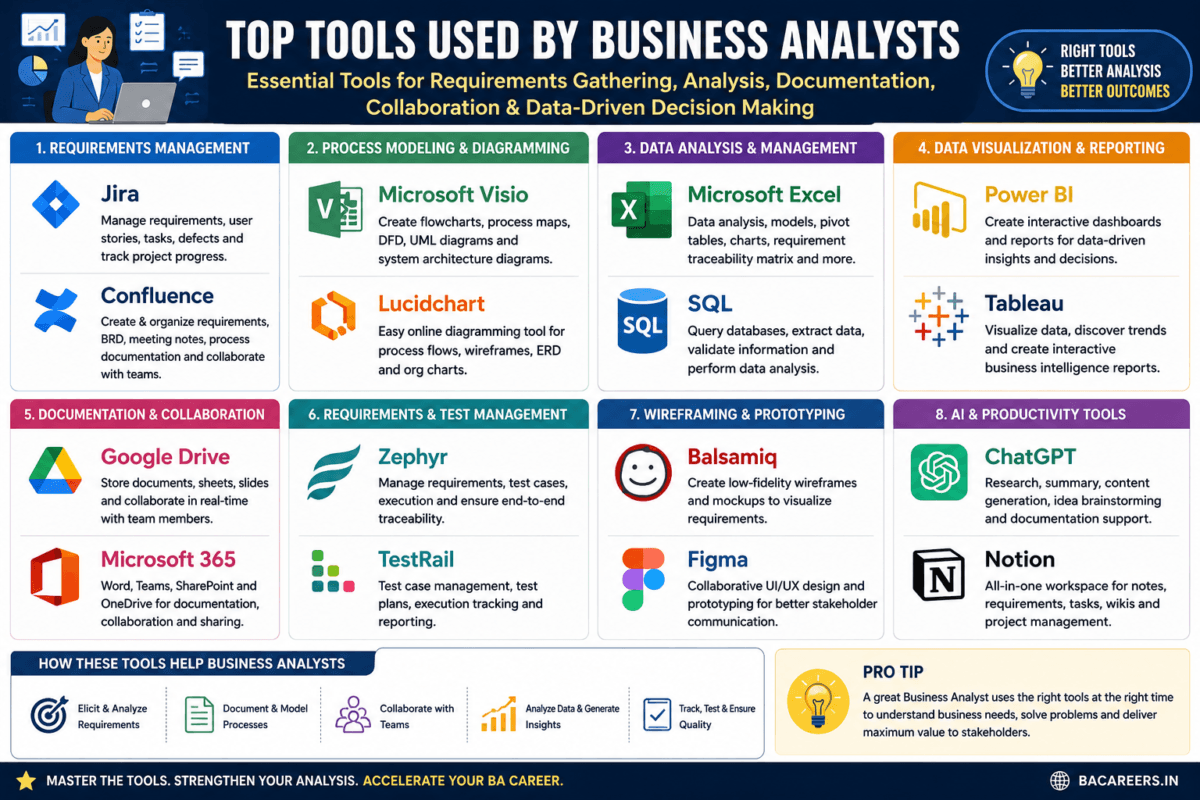
In modern software development and enterprise business analysis, Business Analyst (BA) tools enable analysts to gather requirements, visualize complex business workflows, design user interface wireframes, analyze data sets, and collaborate seamlessly across cross-functional teams.
What Are the Essential Tools Used by a Business Analyst?
Business Analysts (BAs) play an integral role connecting business stakeholders and the respective development teams they serve, utilizing a set of purpose-built software tools that augment their efforts throughout the software development life cycle (SDLC).
These tools can generally be categorized into five groups:
Requirements management, Process modeling, Prototyping and wireframing, Data analysis and Business Intelligence (BI), and Artificial Intelligence (AI) and Automation.
Key Takeaway: Modern BAs generally work with a blend of diagramming/visualization tools like Lucidchart and Visio, collaboration/project management platforms like Jira and Confluence, and data exploration tools like SQL, Excel, and Power BI.
Essential Business Analyst Tools by Functional Category
Key BA Tools Broken Down By Function Common core business analyst tools and software used in large global organizations
1. Requirements Management and Agile Project Management Tools
That help you manage requirements, develop user stories and sprints
1. Jira (by Atlassian): Considered the global standard for Agile project management, Jira helps product teams manage Epics, user stories, sprint goals, backlog ordering, burndown charts, and project pacing.
2. Confluence (by Atlassian): a centralized hub for team collaboration and knowledge management where BAs build and maintain all documentation, such as Business Requirement Documents (BRD), Functional Requirements Specifications (FRS), meeting minutes and project documentation.
3. Azure DevOps (ADO): the one-stop enterprise platform for software development including backlogs, work items, requirements linked to code, CI/CD integration and QA.
2. Process Modeling and Diagramming
Software that visually illustrates how business process and system flows work.
1. Lucidchart: a visually-driven cloud app popular for drawing a range of diagrams, including use cases, activity flows, UML sequences and present and future state (to be and as-is) process flows.
2. Microsoft Visio: a detailed diagramming software from Microsoft available for download and on cloud used to draw many types of diagrams including workflow diagrams, swimlanes, system drawings and organizational charts.
3. Miro / Mural: collaborate white boarding tools good for design thinking, JAD sessions, user story mapping and remote meetings.
3. Wireframing and Prototyping
Software that allows the creation of basic and complex models of your software interface
1. Balsamiq: The go-to low-fidelity tool favored by BAs for its simplified drag-and-drop interface to draw UI outlines quickly.
2. Figma: A cloud-based design collaboration hub used by product teams to view mockups (high and low-fidelity), comment on designs, and collaborate closely with UX andUI developers.
3. Axure RP: Used for creating high-fidelity, dynamic prototypes that can be complex in scope, and include dynamic panels.
4. Data analysis and Business Intelligence (BI)
Software Tools that help you find trends in data and visualize important key performance indicators (KPIs)
1. SQL: The standard database query language used to read, interrogate, add, and manage database information. It can be executed through SQL Management Studio (SSMS), DBeaver, etc.
It is a valuable skillset in any BA role for its data-mining and data exploration purposes.
2. Microsoft Excel (Advanced): It goes much beyond mere data entry; many BAs rely on its powerful charting capabilities, advanced formulas (e.g. VLOOKUP) and pivot table functionalities for faster analysis, calculations, and data modeling.
3. Power BI & Tableau: Both are industry leading Business Intelligence (BI) tools used for converting complex raw data into interactive reports,dashboards and powerful visualizations.
5. Modern AI and Automation Tools for Business Analysts
(while not as common as the previous categories, AI-powered tools are changing business analysis workflows for forward-thinking BAs).
1. ChatGPT & Claude: Leading generative AI models that can assist with writing user stories, drafting user stories and functional requirement documents, summarizing minutes or even writing test cases.
2. Microsoft Copilot: Integrated within the Microsoft365 applications, Copilot is Microsoft’s conversational AI assistance for creating outlines, writing emails, summarizing documentation and even conducting data analysis in Power BI andExcel.
Comparison Matrix: Top BA Tools Overview
| Tool Name | Core Category | Primary BA Use Case | Skill Curve |
| Jira | Agile Management | Backlog management, sprint planning, writing user stories | Low – Medium |
| Confluence | Knowledge Management | Drafting BRD, FRS, FRD, and project documentation | Low |
| Lucidchart | Visual Diagramming | Flowcharts, UML activity diagrams, swimlane diagrams | Low |
| Balsamiq | UI Wireframing | Low-fidelity screen mockups and user flow sketches | Low |
| SQL (SSMS/DBeaver) | Data Analysis | Database querying, data validation, source-to-target mapping | Medium |
| Power BI | Business Intelligence | Interactive reporting dashboards and trend analytics | Medium |
Business Analyst Tools: Essential Tools & Deep-Dive Guides
| Core Pillar | Deep-Dive Knowledge Areas (Click to Read) | Why It Matters for a Business Analyst |
AI Tools for BAs | Using Ai Tools In Business Analysis Transforming Decision Making | Helps BAs select and use practical tools for requirements, collaboration, modelling and delivery. |
| Prompt Engineering For Business Analysts | Helps BAs select and use practical tools for requirements, collaboration, modelling and delivery. | |
| Bas Guide To Ai Prompt Engineering | Helps BAs select and use practical tools for requirements, collaboration, modelling and delivery. | |
| Future Of Business Analysis How Ai Tools Are Changing The Game 2025 | Helps BAs select and use practical tools for requirements, collaboration, modelling and delivery. | |
| Ai Tools For Requirement Analysis | Helps BAs select and use practical tools for requirements, collaboration, modelling and delivery. | |
| Exploring The Most Important Ai Tools Shaping Our Future | Helps BAs select and use practical tools for requirements, collaboration, modelling and delivery. | |
BA Tools & Productivity | Tools Used By Business Analyst | Helps BAs select and use practical tools for requirements, collaboration, modelling and delivery. |
| What Is Trello How To Use Trello | Helps BAs select and use practical tools for requirements, collaboration, modelling and delivery. | |
| Tools Required For Business Analyst | Helps BAs select and use practical tools for requirements, collaboration, modelling and delivery. | |
| What Are Wireframes | Helps BAs select and use practical tools for requirements, collaboration, modelling and delivery. | |
| Prototyping Unleashing Creativity And Innovation | Helps BAs select and use practical tools for requirements, collaboration, modelling and delivery. | |
Jira | Maximizing Efficiency With Jira Tips And Tricks For Project Management | Helps BAs select and use practical tools for requirements, collaboration, modelling and delivery. |
| What Is Jira | Helps BAs select and use practical tools for requirements, collaboration, modelling and delivery. | |
| From Planning To Execution How Jira Software Can Help You Deliver Successful Projects | Helps BAs select and use practical tools for requirements, collaboration, modelling and delivery. |
Frequently Asked Questions (FAQ)
What is a BA?
A Business Analyst is someone who bridges communication between their company and all stakeholder parties by understanding their needs and processes, determining viable solutions and delivering requirements to the IT development team to enact those solutions.
Do BAs need to code?
It is mostly not required, but being proficient with the basics of SQL will be beneficial for you to run queries to pull information and verify business rules. A basic understanding of data structures like JSON,XML will help BA’s better understand integration requirements and systems.
Which are the best wireframing tools?
In terms of newcomer user friendliness, Balsamiq could be said to be a well-regarded option since it prioritises a visual, sketching format of wire framing which does not have a steep learning curve. In addition to that, Figma can be described as being popular, though having a bigger learning curve than Balsamiq, for the creation of high fidelity mockups and interactive prototypes.
Which software is the most important for a Business Analyst?
Every tool plays a significant role in the development process so there really is no one ‘most’ important software. However, among the most critical BA tools should probably be included the business analysis suite which consists of JIRA, CONFLUENCE, as well as the analysis-ready database query software such as SQL, and in addition visualisations like ORACLE or Microsoft Visio.

Tools Used by Business Analyst:
More Common Tools used by the Business Analyst
MS Excel:
Mostly I use Excel to create flow charts and as per the client requirement, can use Excel to track the requirements and for requirement traceability matrix. We can create multiple things with using Excel like Wireframes, Flow charts and to manage the requirements. Excel contains several built-in mathematical and financial functions which will be useful in data analysis
- Pivot tables
- Examining the trends in data
- Sort and filter data
- Creating charts or graphs
MS Word:
Will use Ms_Word to prepare the multiple documents like FSD , BRD, Release Notes and User Manuals. Most of the stake holders are using the Ms-word to prepare multiple documents.
MS PowerPoint:
Will use power point for presentations. With using powerpoint we can easily explain to stake holders.
Google Search:
If you stuck somewhere and not able to understand what to do and how to do, then Google search will help us to get basic idea. If we need any templates related to documentation also we can get the same with using Google Search.
Microsoft Teams
We can use skype to schedule meetings and we can explain easily via screen sharing to the stake holders. We can easily coordinate with internal and external stake holders with using skype.
Ms _ Visio:
Ms_Visio can be used to draw UML diagrams. We can easily identify with UML diagrams that which actor is doing which task. It will help developers to understand the requirement clearly.
- UML diagrams creation such as use case, sequence diagrams, and activity diagrams.
- To prepare process flow charts
- To create data models
- To generate architecture diagrams
Ms_Project:
Ms_Project can be used to track the requirements.
JIRA :
Jira can be used to track the requirements, issues, Change requests. Most of the organizations are using JIRA tool.
Balsamiq, axure and Pencil :
Balsamiq and axure can be used to create mockups to understand the requirement clearly. And easily we can explain to stake holders. Balsamiq Mockups helps business to work faster and smarter. Moreover, it allows projects to host online. In addition to that, it works as a collaboration tool between team and clients.
I hope this provided you the overview of Tools Used by Business Analyst.
Here I mentioned common tools used by Business Analyst, if you want to know more tools used by Business Analyst then you can browse on google.
Related Articles
- The Ultimate Guide to Scrum Roles and Agile Tools
- How AI is Transforming Business Analytics in 2026: Trends, Tools, Real-World Examples & Career Impact
- How to Create Professional Wireframes Using Free Tools (Without Expensive Software)
- AI Tools Revolutionizing BA Requirement Analysis
- 🧭 Top Tools for Modern Business Analysts
- Future of Business Analysis: How AI Tools are Changing the Game (2025)
There is no single tool; however, Jira, Confluence, SQL, and Lucidchart (or Visio) form the core foundation required for almost every business analyst job role today.
No, coding is generally not required. However, proficiency in SQL for database querying and a fundamental understanding of JSON/XML formats for API data mapping are highly valuable technical BA skills.
Balsamiq is widely recognized as the best tool for beginners due to its drag-and-drop interface and focus on simple, sketch-like low-fidelity wireframes.
🎁 Become a Better Business Analyst
Join 1,200+ Business Analysts learning every week.
Get instant access to:
📘 FREE Business Analyst Templates
🎯 Interview Preparation Guides
🚀 Agile & Scrum Tutorials
🤖 AI for Business Analysts
📈 Career Growth Tips
100% Free • No Spam • Unsubscribe Anytime

Thank you.
Thank You
HI, Thank you for your valuable feedback.
Thank You
Thank You
You can reach me on below
Email: bacareers.in@gmail.com
Email:pallavi@bacareers.in
Website : https://www.bacareers.in
Thank you
Thank YOU
Thank You
Thanks for your valuable feedback.
Can you please let us know the issue, so that we work around and try to resolve the issue.
Please let us know if you get something.
No
Thanks for your feedback.
You can reach me on below.
Email: bacareers.in@gmail.com
Email:pallavi@bacareers.in
Website : https://www.bacareers.in
I have no idea, thanks for visiting my blog
Not mandatory, but good to have.
Thank you.
Thank you
No, Please let me also know if you get something.
You can reach me on below.
Email: bacareers.in@gmail.com
Email:pallavi@bacareers.in
Website : https://www.bacareers.in
Sure, Noted, will do that.
Thank you for your feedback, Noted.
Please reach me.
Email: bacareers.in@gmail.com
Email:pallavi@bacareers.in
Website : https://www.bacareers.in
You can reach me on below and there is a option to subscribe via mail on my home page. Thanks for your valuable feedback.
Email: bacareers.in@gmail.com
Email:pallavi@bacareers.in
Website : https://www.bacareers.in
You can reach me on below, and you can subscribe via Email on my homepage. Thank you.
Email: bacareers.in@gmail.com
Email:pallavi@bacareers.in
Website : https://www.bacareers.in
Please reach me .
Email: bacareers.in@gmail.com
Email:pallavi@bacareers.in
Website : https://www.bacareers.in
Thank you
Thank you
Thank you
Thank you, customized by me as per my requirement.
Thank you .
Please reach me. Yes you can post your articles on your name.
https://www.bacareers.in/contact-us/
Email: bacareers.in@gmail.com
Email:pallavi@bacareers.in
Website : https://www.bacareers.in
Yes, You can post your articles on my website if you are interested.
https://www.bacareers.in/contact-us/
Email: bacareers.in@gmail.com
Email:pallavi@bacareers.in
Website : https://www.bacareers.in
Yes, Thank you.
You can post your articles on my website if you are interested.
Email: bacareers.in@gmail.com
Email:pallavi@bacareers.in
Website : https://www.bacareers.in
https://www.bacareers.in/contact-us/
Yes, Thank you.
Email: bacareers.in@gmail.com
Email:pallavi@bacareers.in
Website : https://www.bacareers.in
https://www.bacareers.in/contact-us/
This is customized by me.
Thank you, Noted.
No as of now.
I am using hostinger
Thank you
Email: bacareers.in@gmail.com
Email:pallavi@bacareers.in
Website : https://www.bacareers.in
https://www.bacareers.in/contact-us/
Thank you
Thank you
Thank you
Thank you
Thank You.
Please reach me if you need guidance.
Email: bacareers.in@gmail.com
Email:pallavi@bacareers.in
Website : https://www.bacareers.in
Thank You.
Please reach me if you need guidance.
Email: bacareers.in@gmail.com
Email:pallavi@bacareers.in
Website : https://www.bacareers.in
Thank You.
Please reach me if you need guidance.
Email: bacareers.in@gmail.com
Email:pallavi@bacareers.in
Website : https://www.bacareers.in
Thank You.
Please reach me if you need guidance.
Email: bacareers.in@gmail.com
Email:pallavi@bacareers.in
Website : https://www.bacareers.in
Thank You.
Website : https://www.bacareers.in
Thank You.
Please reach me if you need guidance.
Email: bacareers.in@gmail.com
Email:pallavi@bacareers.in
Website : https://www.bacareers.in
Thank You.
Please reach me if you need guidance.
Email: bacareers.in@gmail.com
Email:pallavi@bacareers.in
Website : https://www.bacareers.in
Thank You.
Please reach me if you need guidance.
Email: bacareers.in@gmail.com
Email:pallavi@bacareers.in
Website : https://www.bacareers.in
Thank You.
Please reach me if you need guidance.
Email: bacareers.in@gmail.com
Email:pallavi@bacareers.in
Website : https://www.bacareers.in
Thank You.
Please reach me if you need guidance.
Email: bacareers.in@gmail.com
Email:pallavi@bacareers.in
Website : https://www.bacareers.in
Thank You.
Please reach me if you need guidance.
Email: bacareers.in@gmail.com
Email:pallavi@bacareers.in
Website : https://www.bacareers.in
Thank You.
Please reach me if you need guidance.
Email: bacareers.in@gmail.com
Email:pallavi@bacareers.in
Website : https://www.bacareers.in
Thank You.
Please reach me if you need guidance.
Email: bacareers.in@gmail.com
Email:pallavi@bacareers.in
Website : https://www.bacareers.in
Thank You.
Please reach me if you need guidance.
Email: bacareers.in@gmail.com
Email:pallavi@bacareers.in
Website : https://www.bacareers.in
Thank You.
Please reach me if you need guidance.
Email: bacareers.in@gmail.com
Email:pallavi@bacareers.in
Website : https://www.bacareers.in
Thank You.
Please reach me if you need guidance.
Email: bacareers.in@gmail.com
Email:pallavi@bacareers.in
Website : https://www.bacareers.in
Thank You.
Please reach me if you need guidance.
Email: bacareers.in@gmail.com
Email:pallavi@bacareers.in
Website : https://www.bacareers.in
Thank You.
Thank You.
Please reach me if you need guidance.
Email: bacareers.in@gmail.com
Email:pallavi@bacareers.in
Website : https://www.bacareers.in
Thank You.
Please reach me if you need guidance.
Email: bacareers.in@gmail.com
Email:pallavi@bacareers.in
Website : https://www.bacareers.in
Thank You.
Thank You.
Thank You.
Thank You.
Thank You.
Thanks for the feedback
We will try to fix the issue asap.
Thank you
Thank you
Yes.With the same name.
Thank you.
Thanks for your feedback.
I am interesting to learn new topics and interested to share knowledge. As I have good experience in teaching, I feel, I can understand people mind.
Thank you, it is available on my every page.
Please subscribe with your email id to get the updated posts.
Thanks for visiting my blog.
Yes, it is done by my own.
Thank you , you can get on my website in footer section.
Thank you
Thank You
Thank you for your valuable feedback, I will look into that issue.
Thank you for your valuable feedback, I will look into that.
Please let me know if you can help me to get the ideas to improve my Blog.
Please reach me personally,
As of now no, planning to do in near future.
Thanks for visiting my blog, I do not have idea. I will defenetly reach you if I get some imformation.
Please reach me personally
Thank you, but when I checked site is loading properly in IE also, could you please elaborate, so that I can look into.
No, everything done be me, thanks for your valuable feedback.
Thanks for visiting my blog and your valuable feedback, but as of now we are not experiencing any issues.
Thank you
Please reach me on my personnel email id
Sure, please reach me on my personnel email.
pallavi@bacareers.in
HI, as of now no issues observed and we can able to access on IE.
Thank you for your feedback.
Thank you for your valuable feedback, will work on this issue
Sure, Please reach me on my personnel email id.
Thank you for your valuable feedback.
Please reach me on my personnel email id
Reach me on my personnel mail.
Thank You
Thank You.
Thank You
Thank You.
Thank You.
Thank You
Thank You
Thank You
Thank You
Thank You
Thank You
Thank You
Thank You
Thank You.
Thank You.
Thank You.
Thank You.
Thank You.
Thank You.
Thank You.
Thank You.
Thank You.
Thank You.
Thank You.
Thank You.
Thank You.
Thank You.
Thank You.
Thank You.
Thank You.
Thank You.
Thank You.
Thank You.
Thank You
Thank You
Thank You
Thank You
Thank You
Thank You
Thank You
Thank You
Thank You.
Thank You.
Thank You.
Thank You
Thank You
Thank You
Thank You
Thank You
Thank You
Thank You
Thank You
Thank You
Thank You
Thank You
Thank You
Thank You
Thank You
Thank You
Thank You
Thank You
Thank You
Thank You
Thank You
Thank You
Thank YOU.
Thank YOU.
Thank YOU.
Thank YOU.
Thank YOU.
Thank YOU.
Thank YOU.
Thank YOU.
Yes, you can subscribe
Created by me.
Thank You!
Thank You!