

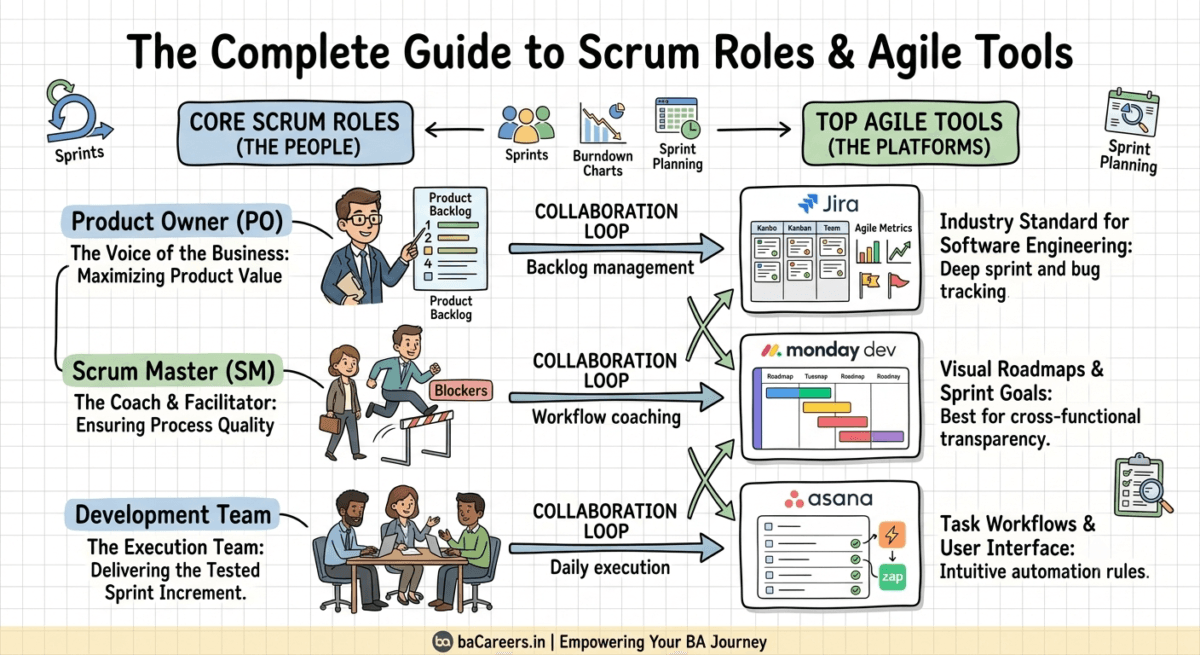
The Ultimate Guide to Scrum Roles and Agile Tools. Achieving on-time, high-quality software delivery involves two components: precise human roles and robust software. When an organization decides to transition to the Scrum framework, it typically faces two initial hurdles: understanding the roles, and choosing software to help execute them. This article will step you through the three basic Scrum roles, along with the three leading Agile tools you can employ to keep teams organized, manage backlogs, and make it to their sprint goals.
The Three Core Scrum Roles Short Definition
The Scrum team is a small, multi-disciplined unit designed for agility, rather than traditional corporate organization.
Within the Scrum framework there are three roles:
Product Owner (PO) The PO is a representation of the business, along with its customers. They is chiefly responsible for the delivery of the value to the business; they has product backlog responsibility in terms of prioritization, so is to say, they decide what should go in it.
The Scrum Master (SM) The SM is the coach to the team; they is not a people manager. They is a servant-leader responsible for maintaining the Scrum process, Removing impediments, protecting the team from external interruptions, and up holding the values of the Scrum framework.
The Development Team : The group responsible for developing the software, designers, testers, developers, andQA analysts is known as Development team members who take the items from the backlog and will generate a potential shippable increment of the product by the end of each sprint.
Top Agile Tools For Project Tracking And Collaboration
The three roles above can be efficiently aligned if teams leverage the proper software. From keeping team members aligned on the product backlog to helping Scrum Masters visualize and remove bottlenecks, the following software tools are key to any agile organization’s toolkit.
| Platform | Best For | Key Advantage |
| Jira | Software Engineering Teams | Industry-standard sprint boards, deep bug tracking, and automated burn-down charts. |
| monday dev | Cross-Functional Alignment | Exceptional visual roadmaps and flexible tracking layouts for non-technical stakeholders. |
| Asana | General Task Workflows | Clean user interface, powerful workflow automation rules, and fast template deployment. |
Platform Best for Key Advantage Jira Software Engineering teams the standard of the software engineering and it contains: the industry-standard sprint boards, deep bug tracking, automated burndown charts.
monday dev Cross-functional teams flexible visual roadmaps and it can cater non-technical teams as well
Asana General task workflows user friendly with automated rules and customizable templates
Mapping Your Scrum Roles to the Right Software Workflow
Team members need to know what tools can and how they can be used based on their role to maximize workflow efficiency.
1. The Product Owner PO workflows revolve around higher-level product strategy. The PO creates the User Stories, defines Acceptance Criteria, and prioritization items within their tool of choice-often Jira or monday dev-prior to each Sprint.
2. The Scrum Master The SM’s workflows focus on overseeing team performance and process flow. Utilizing software such as Jira, the SM monitors progress through cumulative flow diagrams and sprint boards and can identify team delays during Daily Stand-ups or Retrospectives.
3. The Development Team The DE workflow is task-oriented within the Sprint. Developers use the sprint board in their software to track their tasks from “To Do” to “In Progress” to “Done” without the need for email status updates.
Frequently asked questions
Can one person be both the product owner and scrum master?
Though in a smaller team or business it may be tempting to do so, it is highly unadvisable, because it creates a conflict of interest. It can be difficult to represent two conflicting roles that demand high levels of prioritization to achieve value and commitment to process excellence simultaneously.
What is the most popular tool for a new agile team?
The three most popular choices are Jira, Asana, and monday dev. For many organizations that are new to agile, user-friendly tools such as monday dev and Asana offer flexibility to accommodate non-technical roles as well as a visual product roadmap. The most widely-adopted tool in software development is Jira, which comes with built-in, advanced integrations with code management and bug tracking tools.
How can a software tool prevent scope creep in the sprint?
In a sprint context, the sprint scope is effectively ‘locked down’ once the sprint is initiated. If a new task must be inserted, there needs to be visibility around this, typically identified on the sprint board as a scope change.
When this happens, it will automatically reflect the new velocity metrics for the sprint.
The Conclusion:
Aligning people and platforms Implementing a framework such as Scrum not only means clearly defining and understanding roles but also having tools in place that facilitate seamless communication and collaboration within the team. By defining distinct Scrum roles and choosing the right agile tools, your organization can effectively align team members to consistently deliver valuable product increments.

Business Analyst & Technical Content Writer specializing in Agile, Scrum, Requirements, User Stories, BRD/FRD, SEO blogs, and technical documentation.

