Neuroscience for BAs: Understanding Stakeholder Psychology for Better Solutions

Neuroscience for Business Analysts

Introduction

Many Business Analysts think that gathering requirements is just about asking good questions, writing down the answers, and moving on.

But the truth is, requirements are influenced by human feelings, memories, personal views, fears, and goals.

This is where neuroscience becomes a powerful tool.

When BAs understand how the human brain works — how people think, respond, process, and make decisions — they can:

Get more accurate requirements
Lessen confusion and resistance from stakeholders
Improve teamwork and trust
Deliver better solutions with fewer changes

This article looks at stakeholder psychology through the lens of neuroscience and explains real techniques BAs can use in their projects.

1.Why Neuroscience Matters in Business Analysis

Stakeholders aren’t just logical — they have emotions
Neuroscience shows that:
Most decisions are made emotionally before a person gives a logical reason
People depend on mental shortcuts (cognitive biases)
The brain naturally avoids risk, uncertainty, and difficult thinking

As a BA, when you are getting requirements, solving problems, or suggesting solutions, you need to realize that:

Stakeholders often don’t say what they truly need.They tell you what their brain allows them to say

2.Cognitive Biases Every BA Should Know
 Confirmation Bias

Stakeholders look for information that supports their existing ideas
Real-Life Example
A senior manager believes that customers like phone support better than chat.
Even if the data shows chat is popular, they might ignore that.

BA Tips

Show evidence visually to avoid emotional resistance
Use stories about user experiences instead of raw numbers
Ask neutral questions like:
“What might make customers choose chat over phone support?”

Anchoring Bias

The first idea or number shared becomes a starting point

Example

The first timeline mentioned is “6 months.”
Even if the real timeline is 12 months, the stakeholder keeps thinking it’s 6-months.

BA Tips

Don’t give estimates early
Provide ranges instead of a single number
Use real risks and effort to reframe the estimate

Status Quo Bias

The brain prefers familiar things.
Change feels scary

Example

A sales team refuses to move to a digital CRM because they “have always used Excel.”

BA Tips

Show small steps with low risk
Show how the new system makes their job easier
Share stories of teams who successfully changed

3.Emotional Triggers and the BA’s Role

Neuroscience shows that the amygdala, which controls emotions, can stop logical thinking when someone feels:

Threatened
Unheard
Overwhelmed
Embarrassed

BA Tips

Have calm and structured conversations
Let people feel safe to speak
Listen carefully, without cutting in
Ask questions softly
Repeat and agree with their view: “So you’re worried that…”

This helps reduce emotional resistance and makes collaboration better.

4.Using Framing Effect for Better Requirement Discussions

Framing is how we present information, which affects how people react

Example

“We will reduce errors by 30%” feels positive
“We currently have 30% unnecessary errorsfeels negative

BA Tips

When suggesting a new process:
Focus on what they gain, not what they lose

Example

Instead of saying:
“Your manual tasks will be automated.”

Say:
“You’ll save 3 hours a day for strategic work.”

5.Cognitive Load: Why Stakeholders Give Wrong Requirements

Cognitive Load Theory says the brain can only process so much information at once

If a stakeholder is overloaded (too many questions or too much data), they may:

Give wrong answers
Feel frustrated
Stop participating in discussions
Change their mind later

BA Tips to Reduce Cognitive Load

Split sessions into smaller parts
Don’t ask too many questions at once
Use visual tools like UML, flowcharts, or maps
Summarize often: “Here’s what we’ve covered so far…”

6.Neuroscience Techniques to Improve Requirement Quality
Use Storytelling

The brain remembers stories much better than numbers

Use user stories, process stories, or incident stories

Example

Instead of asking:
“How does your approval process work?”

Ask:
Tell me about the last time you approved a customer contract.”

This helps get real behavior, not just imagined steps

 Mirror Neurons & Building Rapport

Mirror neurons help people connect emotionally

BA Tips

Match tone and pace softly
Gently mirror emotions
Use friendly body language
Maintain a positive attitude

This encourages stakeholders to share more during requirement gathering

Chunking Information

Break complex information into smaller, meaningful parts

Example

Step 1: Customer submission
Step 2: Internal review
Step 3: Manager approval
Step 4: Final confirmation

Chunking makes things easier to understand and less overwhelming

7.RealWorld Scenario: Dealing with a Resistant Stakeholder

Context

A BA is introducing an automated invoice processing tool.

The accounts manager keeps rejecting new workflows

Through a Neuroscience Lens

Their brain fears losing control
Too much information makes the new system seem complicated
They don’t want to change because it feels new
Past failures make them worry

BA Strategies

Focus on benefits: “This automation can save you time on corrections.”

Lower stress: Explain the process using a simple 3-step visual.

Validate feelings: “I understand automation can feel risky…”
Share real success stories.

Involve them early in the design to build ownership

8.How Neuroscience Improves BA Collaboration

1.Better relationshipsBetter requirements
Understanding people’s psychology builds trust

2.Better communicationFewer misunderstandings
Using framing, visuals, and chunking improves clarity

3.Better decisionmakingFaster solutions
Fewer emotional barriers make approvals quicker

4.Better handling of disagreement
Neuroscience helps BAs manage emotional tension

Conclusion

Neuroscience isn’t just for scientists — it’s a powerful tool for Business Analysts

By understanding how people think, decide, and act, BAs can:

Ask better questions
Reduce misunderstandings
Handle resistance well
Build strong relationships
Provide solutions that truly meet real needs

A BA who knows neuroscience becomes more than a requirements gatherer — they become a strategic partner who creates solutions that work with how people naturally behave.

Related Articles:

These strengthen the SEO credibility of your article:

Crafting Impactful BA Presentations That Persuade

Business Analyst presentation skills
Ever feel like your brilliant Business Analyst insights aren’t getting the attention they deserve during a presentation?

You’re not alone.
Many Business Analysts face a challenge where their valuable ideas don’t make an impact on decisionmakers.

This guide shows you how to create presentations that don’t just inform, but also persuadehelping to drive real business decisions and get support from key people.

1.
Beyond Bullet Points: Start with Your Audience

Understanding who your audience is and what matters to them is the first step.

Before you create any slide, ask yourself: Who am I speaking to and what are their main concerns?

Everyone involved — like project sponsors, developers, and usershas different needs and expectations.

For example,

If you’re presenting a requirements analysis to a CFO, focus on cost and return on investment.

But if you’re talking to a technical architect, highlight system efficiency and how well the system can handle growth.

Tip: Create quick stakeholder personas, similar to how you might create customer personas.

List their main challenges, goals, and how they like to receive information.

Define your presentation’s one clear purpose
Every good presentation starts with a single clear goal — not ten different things.

Are you trying to get approval, explain a problem, or suggest a solution?

Figure that out before you even open PowerPoint.

Example:

When a Business Analyst presents a new process improvement, they shouldn’t overwhelm the room with all the details.

Instead, they should focus on why the change matters and how it improves efficiency.

The “So What” Factor
After every slide, ask yourself: So what?
Why should the audience care?
Stakeholders are busy, so relevance is key.

Example:

Instead of saying, “System downtime reduced by 30%,” say, “This means an extra 2 hours of customer service every day, which helps improve satisfaction scores.”

2.
The Narrative Arc: Telling a Story That Matters

Crafting a compelling problem statement
Good presentations start with a problem that stakeholders can relate to and care about.

Use data and feedback from users to show the issue clearly.

Example:

Last quarter, our support team dealt with 1,200 repeat complaints about delayed invoice generationcosting ₹3.5 lakhs in extra work.”

This sets the tone and shows how urgent the issue is.

Link: How to Write a Business Requirements Document (BRD)

Building logical bridges: Connecting data to solutions
The strength of a Business Analyst lies in connecting facts to outcomes.

Each slide should move from the issue to analysis, then to the solution, and finally to the benefit.

Example:

Use a process flow diagram to show the current workflow and the new one.

Then use metrics to show the expected improvement.

Anticipating objections
Think like your stakeholders.
If your suggestion requires more time or money, address it directly.

Example:

“If we delay the rollout by two weeks, the QA team can test realworld scenariosreducing postdeployment bugs by 40%.”

This shows you’ve considered the challenges and builds trust.

3.
Visual Persuasion: Data That Speaks

Choosing the right chart for your message
Numbers only tell a story when shown clearly.

Bar chart: Compare different categories (e.g., before and after changes)
Line chart: Show how something changes over time (e.g., improvement in defect rates)
Pie chart: Show how parts make up a whole (e.g., time spent in different project phases)

Example:

A Business Analyst presenting user adoption data can use a line chart to show growth after a new feature was releasedmaking the message clear and compelling.

Decluttering slides: Keep it simple
One of the biggest mistakes in BA presentations is overcrowded slides.

Each slide should focus on one idea, supported by visuals and explained clearly.

Tip: If a slide has too much text, create a detailed version for documentation and a simplified version for the presentation.

Using color and icons wisely
Color can help convey meaninggreen for success, red for risk, blue for reliability.

Icons can guide attentionarrows for flow, checkmarks for approval, warning symbols for risks.

Example:

A risk heatmap using color intensity immediately draws attention to the most critical areas.

4.
Mastering Delivery: Communicating with Confidence

The power of silence
A pause isn’t awkward — it shows confidence.

When you make an important point, pause for two seconds.

This lets your message sink in and shows you’re in control.

Engaging your audience
Ask questions like:
“Has anyone experienced this issue in their department?”

“What if we could reduce this by 25% without adding extra cost?”

This turns a presentation into a conversation.

Example:

During a requirements meeting, a Business Analyst asked, “Would this workflow save you time on manual data entry?”
— which led to some great ideas from the users.

Using body language and tone
Make eye contact, smile occasionally, and vary your tone to highlight what’s important.

Confidence makes your message more trustworthy.

5.
Call to Action: Getting Results

Crafting a clear and actionable request
Don’t end with “Any questions?”
end with a clear request.
Tell who needs to do what and by when.

Example:

Today, I’m asking for approval to move forward with the pilot by next Monday.”

Providing next steps and assigning responsibility
Show a timeline, assign owners, and follow up with a summary email.

Example:

After a stakeholder meeting, a Business Analyst summarizes the key decisions and assigns follow-up actionsensuring no ideas are left behind.

Following up

Impactful Business Analysts don’t stop after a meeting.

They keep things moving by documenting decisions, sharing updated presentations, and checking in on progress — which builds accountability.

Conclusion

Persuasive Business Analyst presentations aren’t about flashy slides — they’re about clarity, understanding, and influence.

When a Business Analyst tells the right story, uses the right visuals, and speaks with confidence, their presentations move from being just reports to being tools for making important decisions.

So the next time you present, remember: Don’t just share informationinspire action.

Related Articles:

External Links

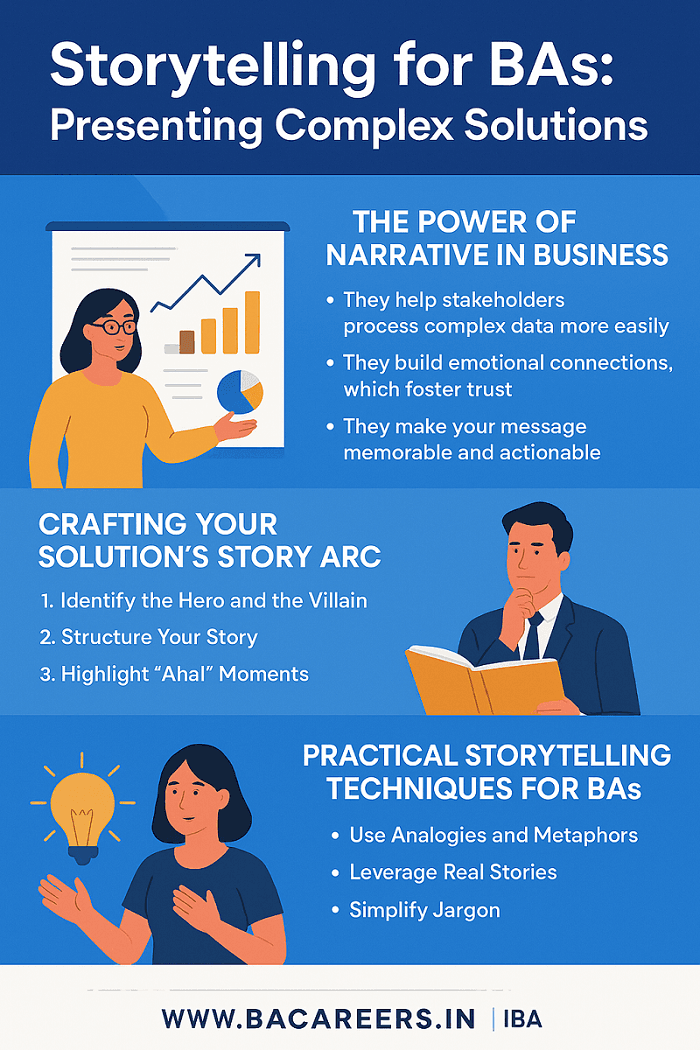
Storytelling for BAs: Presenting Complex Solutions

Storytelling for Business Analysts

Are your presentations often met with blank looks or just polite nods? You’ve done the workanalyzed data, designed processes, and come up with smart ideas—but when it’s time to present, the group seems lost.

That’s because numbers and facts alone don’t grab people‘s attentionstories do.

In today‘s busy business world, Business Analysts need to do more than just show results.
They need to connect with people, build trust, and make others want to take action.
Let’s see how using stories can turn your presentations from boring to engaging.

The Power of Storytelling in Business

People love stories.

From ancient drawings on cave walls to today‘s popular talks, we remember stories, not just lists of numbers.

For a Business Analyst, storytelling helps make complex data easier to understand and connect with business goals.

Why stories work:

They help people understand complicated data better.

They build trust by showing real feelings and connections.

They make your message stick and show what action to take.

Example:

Imagine a BA talking about a new automation tool.
Instead of saying:

Using this tool cuts manual work by 40%.”

Try this:

“Meet Priya, our operations manager, who spends half her day checking invoices.
With our new tool, she’ll finally have time to focus on solving problems, not just entering data.

Suddenly, people care.
They can see the real difference.

Reallife Example:

In a bank, a BA used a storybased approach to get support for a compliance project.
By focusing on “keeping customers safeinstead of “upgrading systems,” leadership approved the project quickly—within one meeting.

1.
Identify the Hero and the Villain

Hero: Your customer, user, or stakeholder
Villain: The problem, inefficiency, or risk

Example:

Finance managers (the hero) get stuck with manual work (the villain).
Our new tool (the solution) helps them escape the mess of data entry.

2.
Structure Your Story

Beginning: The current situation—what’s wrong or inefficient
Middle: The journey—your solution and how it changes things
End: The future—how much better things get, how efficient, or how happy customers are

3.
Highlight ‘Aha!’ Moments

Show key ideas that make your audience say, “Oh, I get it now!”

For example, show how dashboards save time and help people make better decisions.

Tip:
If you’re presenting in a workshop or sprint review, use visualsflow diagrams, before-and-after charts, or short user stories can make your message more real.Effective Requirement Elicitation Techniques
Learn how to get the details that help build your story.

Practical Storytelling Tips for BAs

Here‘s how to use storytelling in your everyday presentations.

1.
Use Analogies and Metaphors

Make complex ideas simple by comparing them to something familiar.

Example:

Think of this workflow like a GPS—it shows the way and warns about traffic ahead.”

2.
Use Real Stories

Client stories: Show the human side of success.

Case studies: Share real outcomes, not just features.

Personal stories: Share lessons from past projects.

3.
Simplify Jargon

Use simple business language instead of technical terms.

Example:

Instead of sayingAPI integration reduces latency,” say, “Our systems will finally work together in realtime.”

4.
Use Visual Storytelling

Use picturesprocess maps, storyboards, or mockups—to help your audiencesee” the story.
Tools like Miro, Lucidchart, or Figma can help.

Your Call to Action: Be a Storytelling BA

Key Points:

Facts help, but stories move people.

A clear story turns complex ideas into easy-to-understand messages.

Storytelling makes you a better communicator and changemaker.

Try This:

In your next presentation, replace one data slide with a story—someone real, a problem they face, and how your solution helps them.

You’ll notice the difference right awaymore interest, more questions, and more support.

Conclusion

Storytelling isn’t just a “soft skill”—it’s a powerful way to communicate that sets good BAs apart from great ones.

When you tell a story, you don’t just show data—you inspire people to act, build trust, and create real change.

So, the next time you’re making a BRD, an executive presentation, or a sprint demo, remember:
Don’t just show the data.
Tell the story behind it.

PMI – The Importance of Communication in Project Success.

🔗 Related Articles:

  1. Agile Methodology for Business Analysts

  2. Stakeholder Engagement Strategies

  3. Effective Requirement Elicitation Techniques

  4. Business Analyst Interview Tips

  5. Change Management for Business Analysts

🌐 External Links

  1. Harvard Business Review – Why Your Brain Loves Good Storytelling

  2. International Institute of Business Analysis (IIBA)

  3. PMI – The Importance of Communication in Project Success

error

Enjoy this blog? Please spread the word :)