

FREE DOWNLOAD: Business Analyst Documentation Toolkit
Get instant access to real-world BRD, FRD, and project story templates used by senior BAs.
Download Free Templates PDFWhat is Power BI and How Do Business Analysts Use It?
Power BI is a Microsoft business intelligence and data visualization platform that enables Business Analysts to connect to disparate data sources, transform raw operational data into structured analytical models, and design interactive visual dashboards that drive executive decision-making.
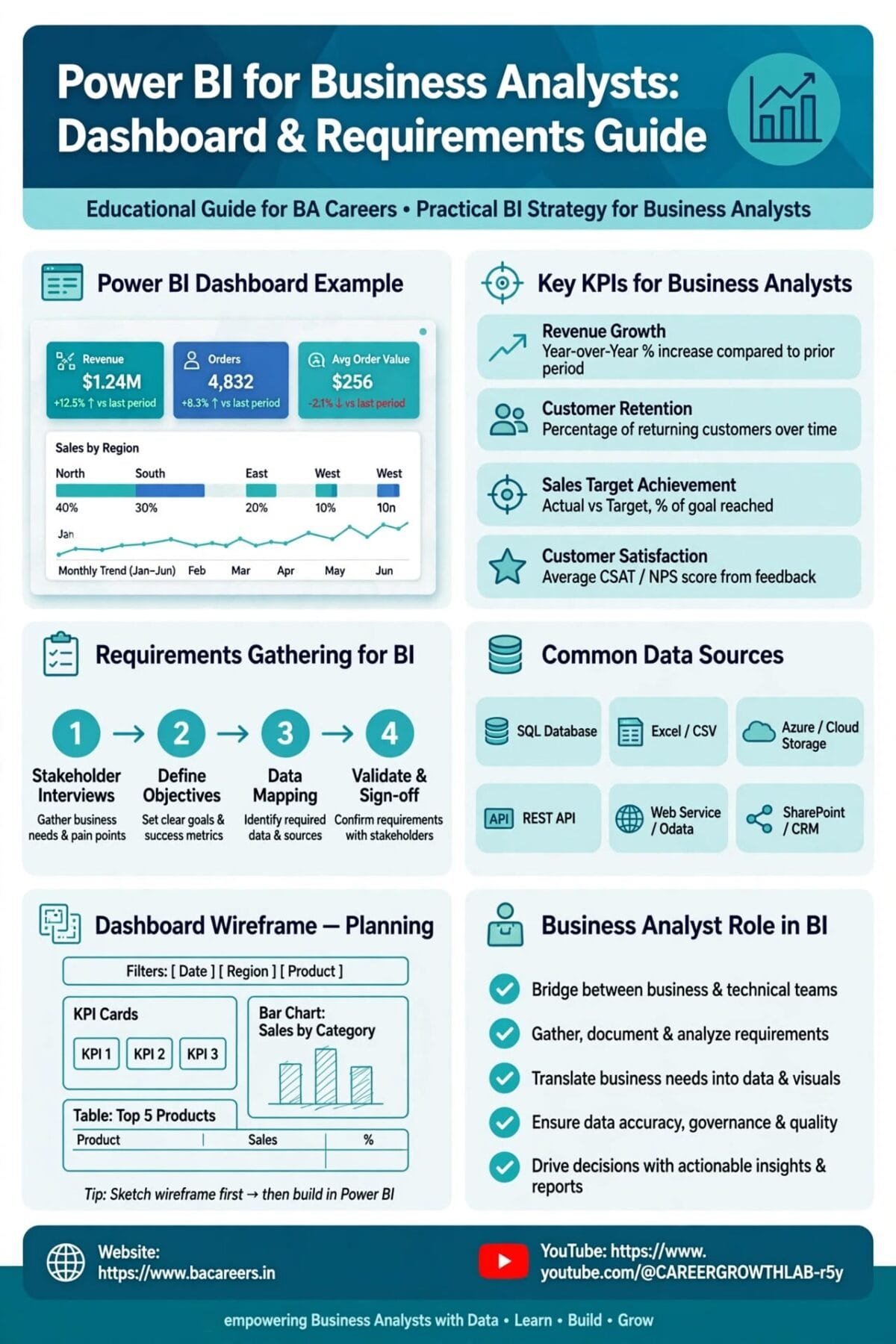
In modern enterprise environments, Business Analysts bridge the gap between business stakeholders and technical BI developers by gathering dashboard requirements, defining key performance indicators (KPIs), constructing data mapping specifications, and prototyping low-fidelity report mockups.
[ Raw Data Sources (SQL/Excel/APIs) ] ──► [ Power Query Data Cleaning ]
                                                    │
                                                    ▼
[ Interactive Executive Dashboards ] ◄── [ Power BI DAX & Data Models ]
The BI Requirement Elicitation Lifecycle for Business Analysts
Gathering requirements for reporting and analytics projects differs significantly from traditional software feature development:
Defining Business KPIs: Identify exact operational metrics (e.g., Monthly Recurring Revenue (MRR), Customer Churn Rate, First Contact Resolution).
Data Source Identification: Locate underlying source tables, database fields, and update frequencies (Real-Time, Hourly, Daily Batch).
Dashboard Mockup & Wireframing: Design low-fidelity report layouts in tools like Miro, Figma, or Balsamiq to validate visual hierarchy with C-suite executives.
Data Mapping Documentation: Construct detailed field mapping documents linking UI visuals to SQL database columns.
Essential Power BI Components & DAX Basics for BAs
| Power BI Feature | Component Function | Business Analyst Practical Application |
| Power Query | Extract, Transform, and Load (ETL) engine used to clean messy data. | Merging customer tables, removing duplicate rows, unpivoting columns. |
| Data Model (Star Schema) | Relationship structure connecting Fact and Dimension tables. | Linking Sales_Fact tables to Customer_Dim and Date_Dim tables. |
| DAX (Data Analysis Expressions) | Formula expression language used to calculate custom measures. | Writing formulas to compute Year-over-Year (YoY) revenue growth. |
| Row-Level Security (RLS) | Access security rules restricting data visibility based on user roles. | Ensuring Regional Managers only view data for their assigned geography. |
Basic DAX Measures Every Business Analyst Should Recognize
// 1. Total Revenue Measure
Total Revenue = SUM(Sales[OrderAmount])

// 2. Filtered Revenue Measure (High-Value Deals)
Enterprise Revenue = CALCULATE(SUM(Sales[OrderAmount]), Customers[Segment] == "Enterprise")

// 3. Year-Over-Year Sales Growth
YoY Growth % = DIVIDE([Total Revenue] - [Prior Year Revenue], [Prior Year Revenue], 0)
📊 Real-Time Scenario: Gathering Requirements for a Retail Sales Dashboard
Context & Objective
A Business Analyst is tasked with defining requirements for an Executive Regional Sales Dashboard for a retail chain.
+-----------------------------------------------------------------------------------+
|               DASHBOARD MOCKUP WIREFRAME (EXECUTIVE SUMMARY PAGE)                 |
+-----------------------------------------------------------------------------------+
| [ KPI Card: Total Sales ] | [ KPI Card: Active Users ] | [ KPI Card: Avg Order ] |
+-----------------------------------------------------------------------------------+
| [ Visual: Monthly Sales Trend Line ]  |  [ Visual: Revenue by Region Bar Chart ] |
+-----------------------------------------------------------------------------------+
| Slicers / Filters: [ Date Range Dropdown ] | [ Region Slicer ] | [ Store Category ] |
+-----------------------------------------------------------------------------------+
Data Mapping Specification Table Created by the BA
| Dashboard Visual | Target Metric | Required Formula / Logic | Source Database Table & Field | Filter / Drill-Down Rules |
| KPI Card 1 | Total Sales ($) | SUM(order_amount) | db_sales.orders.total_price | Filtered by selected Date Range. |
| Bar Chart | Sales by Region | SUM(order_amount) grouped by region_name | db_retail.stores.region_code | Interactive filter; clicking bar updates entire report. |
| Table Grid | Top 10 Products | TOPN(10, Product, Sales) | db_inventory.products.item_name | Sortable descending by total revenue. |
Business Analyst vs. Power BI Developer: Role Comparison
| Responsibilities | Business Analyst (BA) | Power BI Developer |
| Primary Focus | Business KPIs, stakeholder alignment, user requirements. | Complex DAX coding, data modeling, backend query tuning. |
| Deliverables | BI Requirements Document, Wireframes, Data Mapping Specs. | .pbix Dashboard files, Data Warehouse Architecture, Refresh Pipelines. |
| Stakeholder Interaction | High (sponsors, department heads, domain leads). | Medium (technical leads, database administrators). |
🔗 Business Analysis Resource Hub (Internal Links)
📘 Data Analytics Concepts: What is Data Mapping? Complete Guide — Learn foundational data mapping principles.
🛠️ Analytics Lifecycle: Business Analytics Life Cycle: From Data to Decisions — Explore end-to-end data pipelines.
🎓 Role Overview: Data Analyst vs Business Analyst: Role Comparison — Understand career boundaries and overlap.
Frequently Asked Questions (FAQ)
Both tools are industry leaders. Power BI is widely adopted across enterprises using Microsoft 365 ecosystems, whereas Tableau is popular in heavy data-centric enterprises. Learning Power BI gives BAs a strong foundation in data modeling and DAX calculations.
No. BAs should understand foundational DAX measures (SUM, AVERAGE, CALCULATE) to validate report logic, but complex DAX modeling is typically handled by specialized BI Developers or Data Engineers.
The most critical step is defining clear business metrics and KPI definitions upfront. Building a visually appealing dashboard without aligned business definitions results in reports that business teams do not use.
🎁 Become a Better Business Analyst
Join 1,200+ Business Analysts learning every week.
Get instant access to:
📘 FREE Business Analyst Templates
🎯 Interview Preparation Guides
🚀 Agile & Scrum Tutorials
🤖 AI for Business Analysts
📈 Career Growth Tips
100% Free • No Spam • Unsubscribe Anytime
