

Data mapping is the process of matching fields from one database or system to corresponding fields in another target system. It serves as the foundational architectural blueprint for data integration, system migration, data warehousing, and API development in software engineering and business analysis.
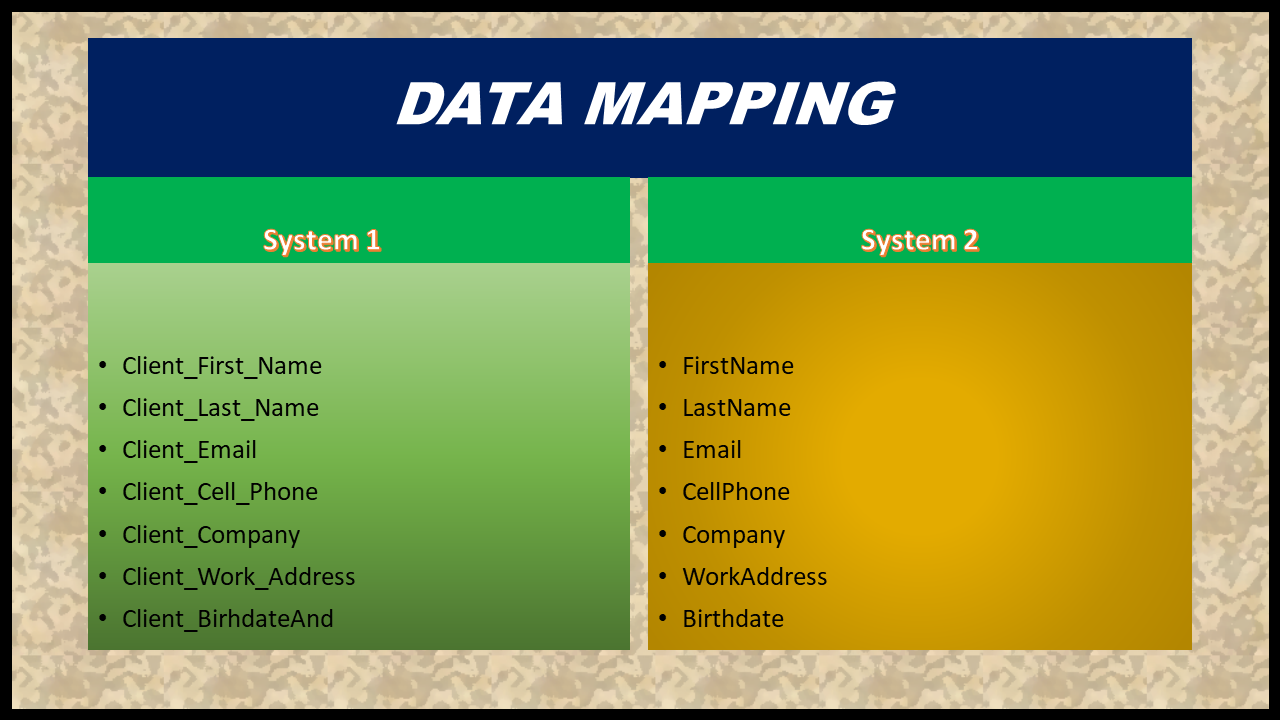
What Is Data Mapping in Software Development?
Almost all software used in the world today works with a specific amount of data or with a few sets of data, but what happens when systems aren’t in sync? DataMapping is a system that connects at least two differing data models to be consistent and predictable for the position of every bit of data as it travels from a source system to a destination system-by position, data type, format, and structure.
Without DataMapping, organizations are at risk of receiving incorrect or incomplete data. If your organization does not have clear DataMapping as you run through software integrations or even when your system undergoes some migrations to the Cloud or for different business purposes like new analytics software, your company is at great risk.
This may lead to software misinterpretations. As such, a document called “DataMapping Document “ needs to be created and utilized by a Business Analyst and a Data Analyst or Integration Specialist or it needs to be shared along with data engineers/ETL engineers, for the Software the organization or Company is considering.
The essential question DataMapping answers in software development-
DataMapping addresses simply by answering how do we connect this item here to another item across there? That is. How should field X in system A transform, translate, and map to field Y in system B? DataMapping follows a consistent process that allows both source and destination data to flow properly.
Top Five Step Process In Mapping Your Data.
1. Define Data Scope: -Define and focus in on precisely which data you’ll be targeting for export and where it’s headed in the target system.
2. Discover & Analyze Fields: – Analyze the source and target data types so that you’re clear about what types of fields you are looking at. This step also allows you to understand if certain data are required, mandatory, have some specific defaults, or what field lengths you should be working with.
3. Define Transformation Rules:=Define-Formulate, based on these attributes business rules, on what basis data values needs to be transformed or lookup in another field. Some transformations include changing the format, like YYYY-MM-DD to DD/MM/YYYY, converting values like country code to country names, or deriving Sales Region by providing Postal codes.
4. Execute & Test Mapping Logic: = Test-Run data and compare the results to ensure data moved according to defined rules and formats, and that nothing got lost or mismatched.
5. Maintain & Document:– Formalize the data mapping specifications in a document that future teams can reference; this ensures and proves you complied with all regulations. For that purpose, these docs may come in handy even for future or upcoming migrations or integrations.
Practical Example: Source-to-Target Data Mapping Specification
Consider a scenario where a legacy Core Banking System is being migrated into a modern Cloud CRM platform. Below is a sample Source-to-Target Data Mapping Table:
| Source Field ID | Source Field Name | Source Data Type | Target Field Name | Target Data Type | Transformation Logic / Business Rules | Mandatory? |
SRC_101 | CUST_ID | VARCHAR(10) | Account_Number | String(15) | Pad with leading zeros to 15 characters (e.g., 0000012345). | Yes |
SRC_102 | FIRST_NAME | VARCHAR(50) | First_Name | String(50) | Trim leading/trailing spaces; convert to Title Case. | Yes |
SRC_103 | LAST_NAME | VARCHAR(50) | Last_Name | String(50) | Trim leading/trailing spaces; convert to Title Case. | Yes |
SRC_104 | DOB | DATE (YYYYMMDD) | Birthdate | Date (ISO-8601) | Reformat from YYYYMMDD to YYYY-MM-DD. | No |
SRC_105 | GENDER_CD | CHAR(1) | Gender | PickList | Map code: M $\rightarrow$ Male, F $\rightarrow$ Female, O $\rightarrow$ Other. Default = Unknown. | No |
SRC_106 | IS_ACTIVE | INT (1/0) | Status | Boolean | Convert 1 $\rightarrow$ True, 0 $\rightarrow$ False. | Yes |
Common Use Cases for DataMapping
Use Cases for data mapping in the business or software realm include:
System Migration – This approach is the solution for those organizations looking to relocate old ERP, CRM, or any othercore system onto cloud platforms such as SAP S/4 HANA or Salesforce.
Integration & APIs– DataMapping becomes essential to enable internal business applications that must interact with outside providers such as Payment Gateways, identity Verification services,etc to share data from internal to external services.
Warehousing & analytics– Data Warehousing refers to the movement of business critical information into a solution like Tableau or Power BI, or to cloud storage platforms that houses large datasets from relational database sources(or simply “source” from an Oracle to an Azure SQL Data Warehouse),often with using ETL software.
Compliance Reporting– Many sectors deal with specific Data Protection orprivacy laws, such asGeneral Data Protection Regulation, Health Insurance Portability & Accountability Act, Payment Card Industry Data security standardsand several others. DataMapping allows for the documentation and auditing of where the sensitive data lives in each business function and also helps in demonstrating compliance.
Popular Data Mapping Tools
Whilebusiness analyst’s might go as far as creating the first or second draft of DataMapping with an Excel spreadsheet, larger and more enterprise companies commonly opt into solutions that specialize in data management and workflow, such as-
- Informatica Power Center / Cloud Data Integration
- MuleSoft Anypoint Platform
- Talend Data Integrator
- Dell Boomi
- Microsoft Azure Data Factory
Frequently Asked Questions (FAQ)
What is the principal purpose of data mapping?
The primary goal of data mapping, above all, is to have a comprehensive way to facilitate or prepare the transformation or migration of data from one information system to another, or through different datasets.
Who are responsible in creating the data mapping documents?
Generally, a team responsible in an organization consists of business analyst (BA) along with the integration lead (s) or DBA (s) to create an effective Data Mapping Document. The integration lead orBA is responsible for understanding the business domain, analyzing the source and target system, creating necessary mappings.
What is data mapping versus data transformation?
Data Mapping shows you which piece of your data goes from the source to the target system, while on the flipside, Data Transformation is the process of changing your source data’s appearance or form to match that of the target field where your data ends up. Data Mapping may simply set out rules where your system’s values should begin. When we write software code, we make that decision of writing scripts that will do data transfer and will ensure our business data’s are kept consistent and correctly organized.
Related Articles :
- What is Data Mapping? A Business Analyst’s Step-by-Step Guide
- Data Modeling challenges / Data Mapping Challenges
- Effective Data Visualization Techniques
- The 19 Best Data Visualization Tools and Software for 2022
The primary purpose of data mapping is to ensure seamless data compatibility and integrity when transferring data between disparate systems, databases, or application interfaces.
The Business Analyst, Data Analyst, or Integration Specialist authors the Data Mapping Document in collaboration with Database Administrators (DBAs) and Development Leads.
Data mapping is the process of defining which source fields connect to which target fields. Data transformation is the actual execution of changing data formats, data types, or values during the transfer process based on mapping rules.
🎁 Become a Better Business Analyst
Join 1,200+ Business Analysts learning every week.
Get instant access to:
📘 FREE Business Analyst Templates
🎯 Interview Preparation Guides
🚀 Agile & Scrum Tutorials
🤖 AI for Business Analysts
📈 Career Growth Tips
100% Free • No Spam • Unsubscribe Anytime

Thank You.
Thank You
Thank You