

FREE DOWNLOAD: Business Analyst Documentation Toolkit
Get instant access to real-world BRD, FRD, and project story templates used by senior BAs.
Download Free Templates PDFIn Agile product development and Scrum frameworks, an Epic is a large body of work that captures a significant business requirement or overarching feature set that cannot be completed in a single iteration or sprint.
Because an Epic is too broad to be estimated and developed at once, it is broken down into smaller, manageable chunks called Features and User Stories, which are then developed across multiple sprints.
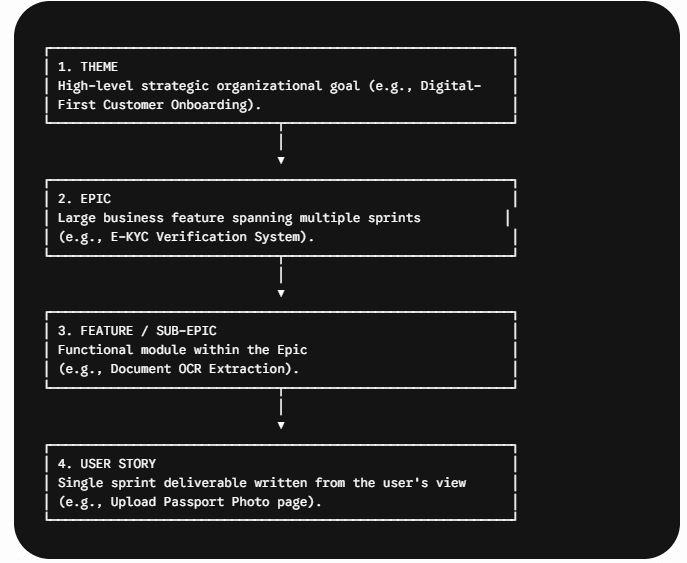
The Agile Hierarchy: Themes, Epics, Features, and Stories
To understand where an Epic fits, Business Analysts use the standard Agile hierarchy:
Key Differences: Epic vs. Feature vs. User Story
| Dimension | Epic | Feature | User Story |
| Scope / Size | Very Large (Spans multiple sprints/months) | Medium (Spans 1–2 sprints) | Small (Fits within a single sprint) |
| Target Audience | Executive Stakeholders & Product Owners | Product Managers & Leads | Developers, QA, & Scrum Team |
| Primary Goal | Defines a high-level capability | Bundles related user functionality | Delivers immediate, testable value |
| Estimation | T-Shirt Sizing ($S, M, L, XL$) | Story Points or Days | Story Points ($1, 2, 3, 5, 8$) |
| Completion Criteria | All underlying child stories are DONE | All grouped stories pass testing | Meets Acceptance Criteria & DoD |
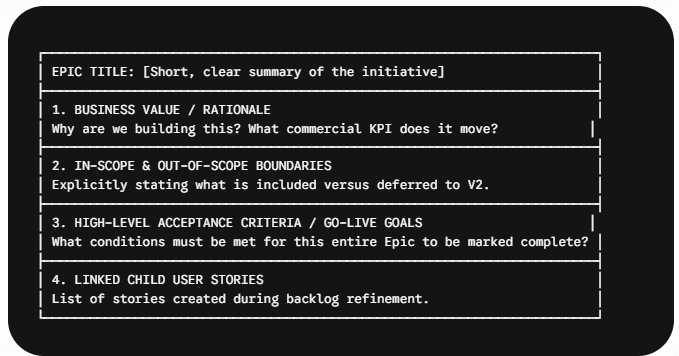
Structure of a Well-Defined Epic
When creating an Epic in tools like Jira, Azure DevOps, or Confluence, a Business Analyst should include these core sections:
Real-Time Business Analyst Scenario: Deconstructing an Epic
1. Background & Context
A retail bank wants to allow customer account creation directly on their mobile app.
Theme: Mobile Banking Digital Transformation
Epic Title:
[EPIC-101] Mobile Self-Service Account Opening
2. Breaking Down the Epic into User Stories
The BA facilitates backlog refinement sessions to slice EPIC-101 into independent, sprint-ready User Stories:
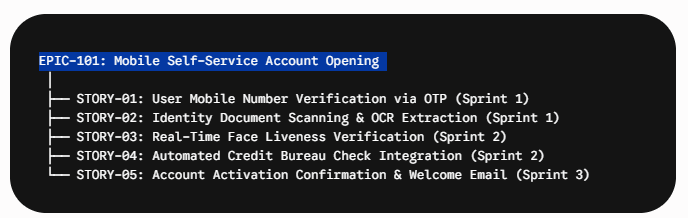
Sample Child User Story (STORY-02):
As a new mobile app customer,
I want to scan my national identity card using my smartphone camera,
So that my personal details auto-populate without manual typing.
How Business Analysts Track Epics in Jira
Epic Progress Bar: Tracked via the completion percentage of underlying user stories.
Burndown / Burnup Charts: Visualizing total story points completed versus remaining within the Epic.
Roadmap View: Mapping Epic timelines across quarters to align business stakeholders on launch expectations.
Agile & Business Analysis – Knowledge Hub
Below is the structured Knowledge Area matrix connecting Agile frameworks, requirements documentation, and delivery workflows:
| Knowledge Area | Deep-Dive Article | Why It Matters for a Business Analyst |
| Agile Frameworks | User Story Guide with Examples | Teaches BAs how to decompose Epics into INVEST-compliant user stories. |
| Scrum Roles – Detailed Guide | Details how BAs collaborate with Product Owners and Scrum Masters to manage Epics. | |
| Agile BA Tools with Scenarios | Demonstrates how to track and manage Epics in Jira, Confluence, and Miro. | |
| Requirements Engineering | BRD Full Form and Template | Shows how high-level business requirements in a BRD translate into Agile Epics. |
| Difference Between BRD and FRD | Explains the shift from traditional documentation to Epic and User Story backlogs. | |
| Documents Prepared by Business Analyst | Master list of deliverables BAs maintain across waterfall and Agile lifecycles. | |
| Elicitation & Analysis | Requirement Elicitation Techniques | Discovery techniques used to gather high-level needs before defining an Epic. |
| AI Tools in Business Analysis | Using AI models to generate Epic outlines, acceptance criteria, and child stories. | |
| Testing & Quality Assurance | UAT Meaning and Importance | Validating that completed Epics meet end-to-end business objectives during UAT. |
| Defect Management Guide | Managing bugs and scope adjustments that arise during Epic execution. |
How to create epic in jira ?
How to Create an Epic in Agile: Step-by-Step Guide
Creating an Epic is not just about logging a ticket in Jira—it is a structured requirements-gathering process where a Business Analyst translates a high-level business goal into an actionable project container.
Phase 1: Step-by-Step BA Workflow
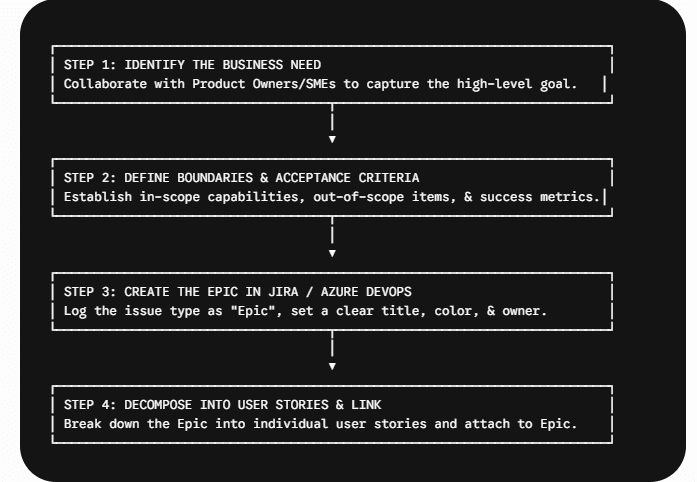
Step 1: Identify and Validate the Business Need
During initial discovery, workshops, or strategic roadmapping, identify major features that are too big for a single 2-week sprint.
Example: “Customers need a way to apply for instant credit cards directly inside the mobile banking app.”
Step 2: Draft the Epic Brief (Summary & Criteria)
Document the commercial value, target persona, and high-level completion criteria so developers understand why the feature is being built.
Step 3: Log the Epic in Your Agile Tool (Jira / Azure DevOps)
Select Issue Type:
EpicEnter a concise Epic Name (used as a tag on child cards) and Summary.
Assign an Epic Owner (Product Owner or Lead BA).
Step 4: Break Down & Link Child User Stories
Conduct backlog refinement sessions with developers and QA to slice the Epic into smaller, testable User Stories. Link each story to the master Epic.
Phase 2: Step-by-Step Jira Guide for Business Analysts
In industry-standard tools like Atlassian Jira, follow these exact steps to create and configure an Epic:
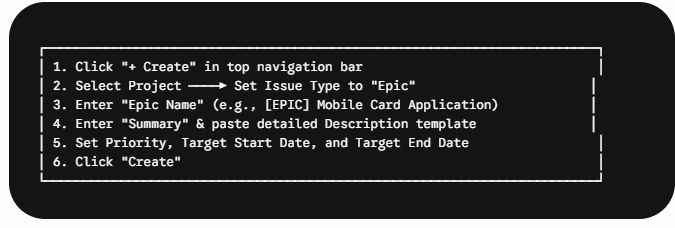
Step-by-Step Actions in Jira:
Log into Jira and click the blue
+ Createbutton in the top navigation bar.Select your Project and set the Issue Type dropdown to
Epic.Fill in Key Fields:
Epic Name: Enter a short tag name (e.g.,
Mobile-Instant-Credit). This tag will appear on every linked user story in the backlog.Summary: Write a descriptive headline (e.g.,
[EPIC] End-to-End Mobile Credit Card Application & Instant Approval).Description: Paste your structured Epic template (Business Value, Scope, Success Metrics).
Reporter / Assignee: Set yourself or the Product Owner as the reporter.
Target Start & Target End Date: Define the targeted quarter/sprint window (e.g., Q3 Sprint 1 to Q3 Sprint 4).
Click
Create.
Phase 3: How to Link User Stories to the Epic in Jira
Once the Epic is created, you can attach individual User Stories to it using two common methods:
Method 1 (From the Backlog View): Open the Jira Backlog, expand the Epic Panel on the left, and drag-and-drop existing user stories directly onto your newly created Epic.
Method 2 (During Story Creation): When creating a new User Story, populate the
Epic Linkfield with your Epic’s name or issue key (e.g.,PAY-104).
Phase 4: Real Jira Epic Template for BAs
Copy and use this standard template in the Jira Description field when creating Epics on your projects:
## 🎯 Business Value / Objective
Briefly describe the business problem and how this Epic solves it.
* **Goal:** Enable instant digital credit card issuing to reduce drop-offs.
* **Target KPI:** Increase credit card applications by 25% within 90 days.
—
## 👥 Target User Personas
* Existing Retail Mobile App Users
* First-Time Credit Card Applicants
—
## 📋 In-Scope Capabilities
* [ ] User pre-eligibility check via API
* [ ] Aadhaar / PAN instant KYC verification
* [ ] Real-time credit limit assignment engine integration
* [ ] Digital card generation and instant wallet activation
—
## 🚫 Out-of-Scope (Deferred to Future Release)
* Physical card issuance workflow
* Add-on card application for family members
—
## 🏁 Definition of Done (DoD) for Epic
* All child user stories completed and passed QA/UAT.
* Compliance and Security audit sign-off received.
* Zero open Critical (P1) or Major (P2) defects.
__________________________________________________________
1. Create a project
2. Add a milestone
3. Set the due date
4. Add a task
5. Add a comment
6. Assign the task to someone
7. Check off the task as complete
8. Click on the green check mark
9. Done!
10. You’re done!
11. Now go back to your board and click on the green check mark again.
12. Done!
13. You’re done!
14. Go back to your board and select the ‘New’ button.
1. Agile is not just about software
Agile is a way of working that emphasizes collaboration over control, communication over documentation, customer satisfaction over project completion dates, and responding to change over following a plan. It’s a philosophy, a mindset, a set of principles, a methodology, a movement, a community, and a culture.
2. Agile is not a silver bullet
It’s not a panacea. It doesn’t work well if you’re doing waterfall projects. But it does work really well if you’re trying to build something complex and innovative. And it works even better if you’re building something that people need and want.
3. Agile isn’t just about software
The core values of agile are applicable to any kind of product or service. You don’t have to use software to practice agile. In fact, agile is often practiced outside of software development.
4. Agile is not about technology
Agile is not about technology. It’s about how we approach problems and solve them. Technology is merely a tool we use to help us do that.
5. Agile is not only about software
Agile embraces many different kinds of products and services. Software is just one example of a product that can benefit from agile practices.
6. Agile is not always about software
Agile encompasses more than just software development. We can apply these same values to non-software development activities. For example, we can apply agile to user experience design, marketing, sales, operations, finance, HR, management, and so on.
7. Agile is not necessarily about teams
We can apply agile to individuals or small groups. We can apply agile to entire organizations. We can apply agile across geographies and cultures.
Frequently Asked Questions (FAQ)
Yes. Depending on system architecture, an Epic may require cross-team contributions (e.g., front-end app team, core backend team, and third-party API team).
While there is no strict rule, most Agile teams target an Epic duration of 1 to 3 months (spanning 2 to 6 two-week sprints). If an Epic takes longer than a quarter, it should likely be split into smaller Epics.
🎁 Become a Better Business Analyst
Join 1,200+ Business Analysts learning every week.
Get instant access to:
📘 FREE Business Analyst Templates
🎯 Interview Preparation Guides
🚀 Agile & Scrum Tutorials
🤖 AI for Business Analysts
📈 Career Growth Tips
100% Free • No Spam • Unsubscribe Anytime

Sure
Thank You.
Thank You