

FREE DOWNLOAD: Business Analyst Documentation Toolkit
Get instant access to real-world BRD, FRD, and project story templates used by senior BAs.
Download Free Templates PDFIntroduction
In the fast-paced world of software development today, nothing creates more project risk than the disconnect between what the business ordered and what engineering delivered. This leads to missed deadlines, budget overages, and a dissatisfied client. Business Analysts (BAs) bridge that gap with a single critical document: the Requirement Traceability Matrix (RTM).
In this article, we’ll walk you through building an RTM from the ground up and achieve 100% coverage.
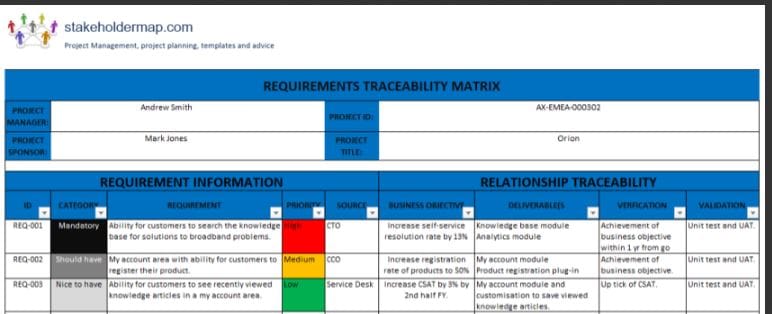
What is a Requirement Traceability Matrix (RTM)?
Simply put, an RTM is a document artifact (often found in Excel or a dedicated requirements management tool) used to connect business requirements with other project elements like design docs, code, and tests. The key purpose is to ensure all requirements have been met, tests can be mapped back to requirements, and that every feature actually had a valid business justification for its existence.
Why is an RTM Essential for Business Analysts?
Not only is it project insurance, but it also provides BAs with tangible advantages:
- Assurance of 100% Test Coverage : This document serves as tangible proof to business stakeholders that each requirement has been tested by QA.
- Stamping Out Scope Creep : By tying every deliverable back to an approved business requirement, RTMs prevent engineering from “gold-plating.”
- Facilitating Impact Analysis : Changes to a requirement are quickly identified and tracked, showing exactly which design docs, code, and test cases need updating.
- Supporting User Acceptance Testing : (UAT) An RTM gives business users a clear guide to follow as they perform testing, giving them confidence that all of their requirements are being tested.
Step-by-Step: How to Prepare an RTM
To create a strong RTM, you’ll need a structured process.
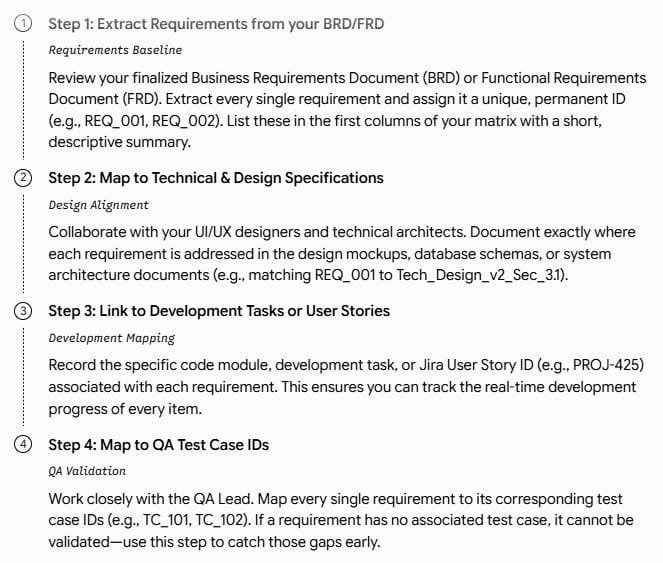
1. Extract Requirements from your BRD/FRD Your first step is to grab your requirements!
Locate your final Business Requirements Document (BRD) or Functional Requirements Document (FRD).
Document each and every final requirement, assigning a unique and unchanging ID (like REQ001, REQ002, etc.). Then, create the first two columns of your RTM with these IDs and concise descriptions of each requirement.
2. Map to Technical & Design Specifications Collaborate closely with your UI/UX designer(s) and technical architect(s).
For each requirement, identify which design document or mock-up and any applicable architectural docs it’s related to (e.g., REQ001 is detailed in TechDesignv2 Sec_3.1).
3. Link to Development Tasks or User Stories Team up with the engineering team to pinpoint the specific Development Tasks or User Stories that will be implementing each requirement. Don’t forget to include the ticket number or ID from your development tool (e.g., PROJ-425).
4. Map to QA Test Case IDs Work with the QA team to connect each requirement with the IDs of the QA test cases that will verify its functionality. This step is crucial – any requirement that cannot be mapped to a test case is a major red flag!
Here is the flow for better understanding.
Standard Excel RTM Structure & Layout
Here’s a basic Excel/Google Sheet example of what an RTM should look like:
| Requirement ID | Source Requirement Description | Tech Design Document Ref | Developer Jira Story | QA Test Case ID | Status (Draft / In Progress / Verified) |
| REQ_101 | User must be able to log in using their registered email and password. | Tech_Design_v1.0 (Sec 2.1) | AUTH-112 | TC_Login_01, TC_Login_02 | Verified |
| REQ_102 | User must be able to reset their password via a secure email link. | Tech_Design_v1.0 (Sec 2.3) | AUTH-115 | TC_Reset_01, TC_Reset_02 | In Progress |
| REQ_103 | System must support secure multi-factor authentication (MFA). | Tech_Design_v1.2 (Sec 3.0) | AUTH-201 | TC_MFA_01 | Draft |
Conclusion
Mastering the Requirement Traceability Matrix is a high-impact skill for Business Analysts, elevating them from order-takers to strategic partners while minimizing project risk by ensuring end-to-end traceability.
FAQ’s : Frequently Asked Questions.
What is the primary purpose of a Requirement Traceability Matrix (RTM)?
An RTM’s primary goal is to verify that all defined business requirements are addressed through the design, development, and testing processes, ensuring that the final software product aligns with the initial specifications.
Can an RTM be automated in modern tools like Jira?
Yes, absolutely. Although manually building an RTM in Excel or Google Sheets is a great way to understand its importance, most contemporary Agile development teams use specialized requirements management tools such as Jira (often with extensions like Xray or Zephyr), Helix RM, or Azure DevOps, to link user stories with bugs and tests seamlessly.
Who is responsible for the RTM?
Generally, the Business Analyst is responsible for managing the requirements portion of the RTM, while the QA Lead is responsible for managing the test case information and execution status.
A Requirement Traceability Matrix (RTM) is a document that links requirements throughout the development life cycle. It helps ensure that each requirement is addressed in the project and provides a way to track changes and verify that they are properly implemented. Here’s a step-by-step guide on how to prepare a Requirement Traceability Matrix:

A Requirement Traceability Matrix (RTM) is a document that helps to ensure that all the requirements of a project are met. It is a tool used in project management that helps to track the requirements throughout the project lifecycle.
To prepare an RTM, you need to start by listing all the requirements of the project. These requirements may come from various sources such as the project charter, stakeholder interviews, or business analysis reports. Once you have the requirements listed, the next step is to organize them in a table format.
The table should have the following columns: requirement ID, requirement description, source, status, and test case ID. The requirement ID is a unique identifier assigned to each requirement. The requirement description column should contain a detailed description of the requirement. The source column should indicate where the requirement came from. The status column should indicate whether the requirement is approved, pending, or rejected. The test case ID column should contain the ID of the test case that verifies that the requirement is met.
Once you have created the RTM, it is important to keep it updated throughout the project lifecycle. This will help to ensure that all the requirements are met and that the project is completed on time and within budget.
Step 1: Define Requirements
- Gather Requirements:
- Collect all project requirements from various stakeholders.
- Ensure that requirements are clear, complete, and unambiguous.
Step 2: Create the Matrix
- Create a Table:
- Use a spreadsheet tool (like Excel) or any other document editor.
- Create a table with columns such as:
- Requirement ID
- Requirement Description
- Source (where the requirement came from, e.g., user, stakeholder, document)
- Status (e.g., Proposed, Approved, Implemented, Verified, Closed)
- Test Cases (related test cases for validation)
- Remarks/Comments
Step 3: Identify Relationships
- Link Requirements:
- Connect each requirement to the corresponding design elements, test cases, and other relevant items.
- Identify dependencies and relationships between requirements.
Step 4: Track Changes
- Change Management:
- Include a column for tracking changes to requirements.
- Document when a requirement is added, modified, or removed.
Step 5: Review and Approval
- Review and Approval Process:
- Ensure that the RTM is reviewed by relevant stakeholders.
- Obtain approval to proceed with the established traceability links.
Step 6: Update Regularly
- Regular Updates:
- Keep the RTM updated throughout the project life cycle.
- Update status, traceability links, and any changes promptly.
Step 7: Use Tools
- Utilize Tools:
- Consider using specialized tools for traceability matrix management.
- Some project management tools and requirements management tools offer built-in traceability features.
Step 8: Conduct Audits
- Conduct Audits:
- Periodically conduct audits to ensure that traceability is maintained.
- Check for any gaps in traceability and address them.
Step 9: Communicate
- Communication:
- Ensure that the RTM is accessible to all relevant team members.
- Communicate any updates, changes, or issues related to requirements.
Step 10: Verify and Validate
- Verification and Validation:
- Regularly verify that the requirements are being implemented as per the traceability matrix.
- Validate that the delivered product meets the specified requirements.
By following these steps, you can create and maintain an effective Requirement Traceability Matrix to ensure that your project requirements are well-managed and properly implemented. Regular updates and communication are key to the success of this process.
🎁 Become a Better Business Analyst
Join 1,200+ Business Analysts learning every week.
Get instant access to:
📘 FREE Business Analyst Templates
🎯 Interview Preparation Guides
🚀 Agile & Scrum Tutorials
🤖 AI for Business Analysts
📈 Career Growth Tips
100% Free • No Spam • Unsubscribe Anytime
